
Your data work has never had a home before. That’s not a criticism of your tooling — it’s the simple reality this product exists to change. The spreadsheets, queries, dashboards, and notebooks that run your part of the business live in folders and memory, and until now there’s been no system whose job was to catalog that work, connect it to business value, and keep the context alive.
Which means that when you open MyDataWork for the first time, you’re not migrating from some worse system. You’re starting a practice that’s genuinely new — and the honest first question isn’t “how does this tool work?” It’s “what should an organized picture of my work even look like?” Which use cases are worth tracking? What does “good” look like for a finance team, a BI team, a consulting engagement?
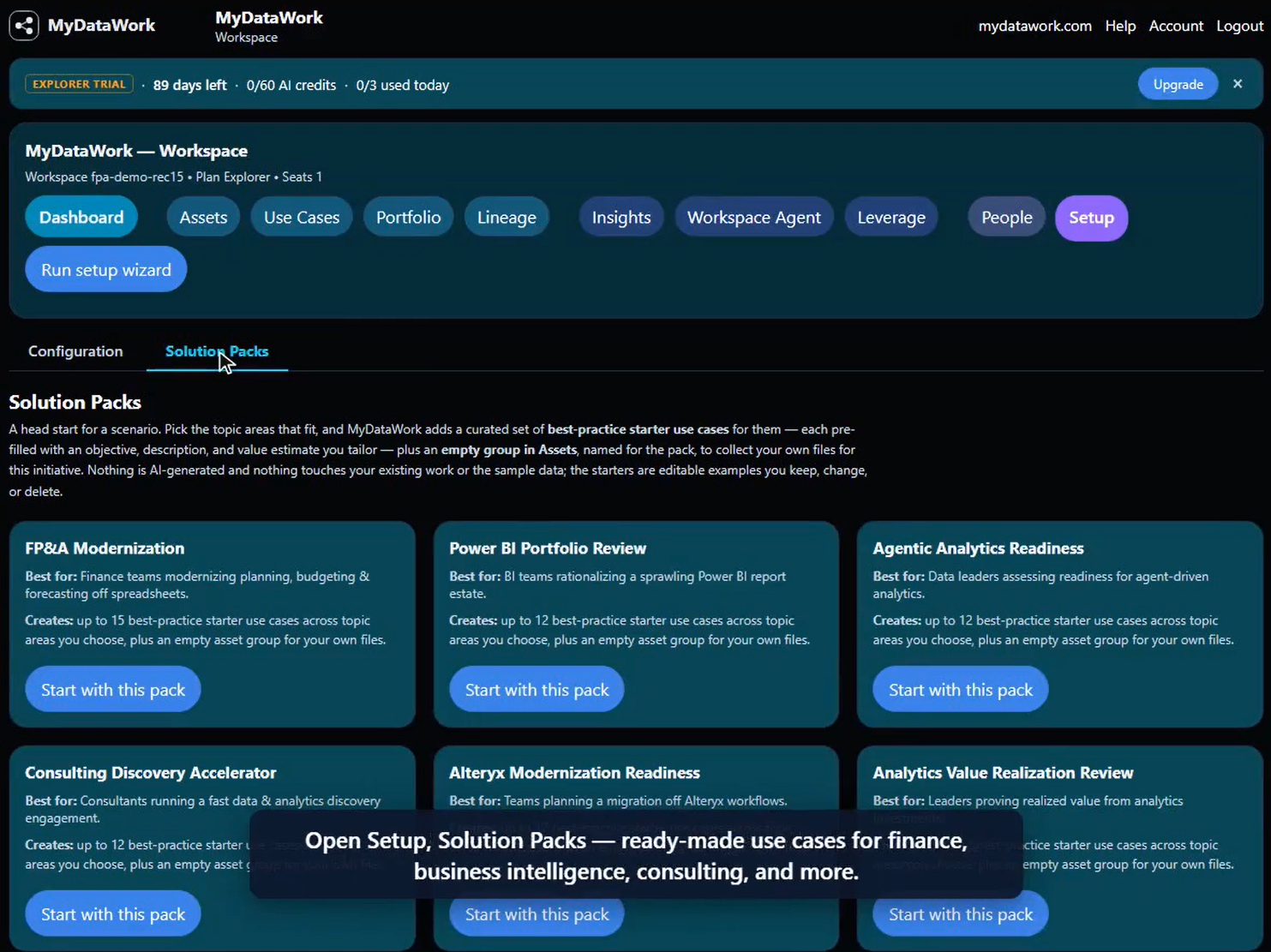
Experienced practitioners already know the answer — they’ve seen what a well-run FP&A program or a disciplined BI rationalization looks like. Solution Packs put that answer in the product. A Solution Pack is a curated library of best-practice use cases for a specific kind of data work — already written, already organized, ready to tailor. Instead of inventing structure from scratch, you start from a plan an experienced practitioner would recognize, then make it yours.
How it works, in one minute
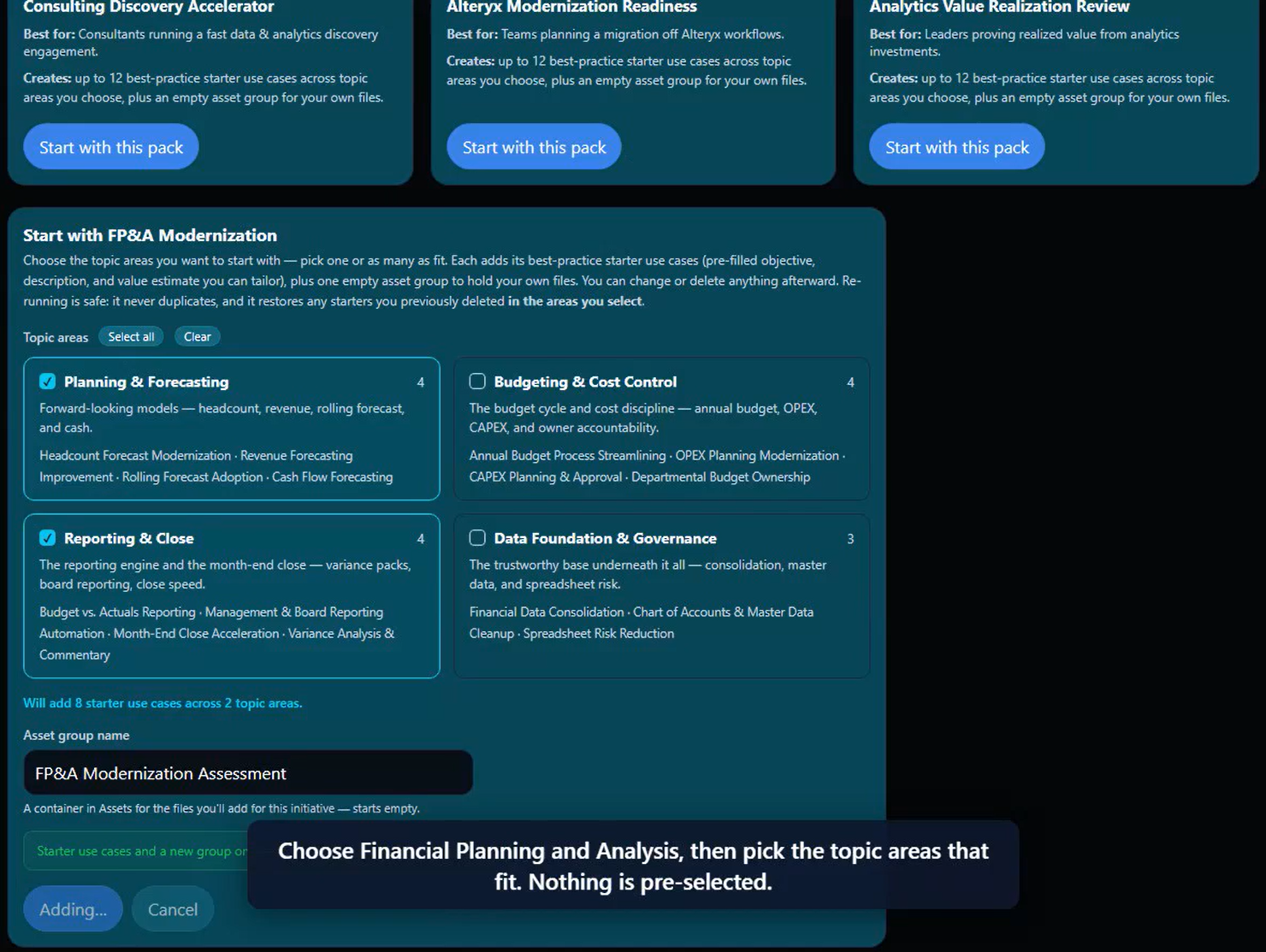
Open Setup → Solution Packs and pick a pack. Say you’re in finance and you choose FP&A Modernization. The pack is organized into topic areas — Planning & Forecasting, Budgeting & Cost Control, Reporting & Close, and Data Foundation & Governance. You pick the areas that match your world (nothing is pre-selected — you’re tailoring, not accepting a dump), and MyDataWork creates a set of starter use cases for exactly those areas.
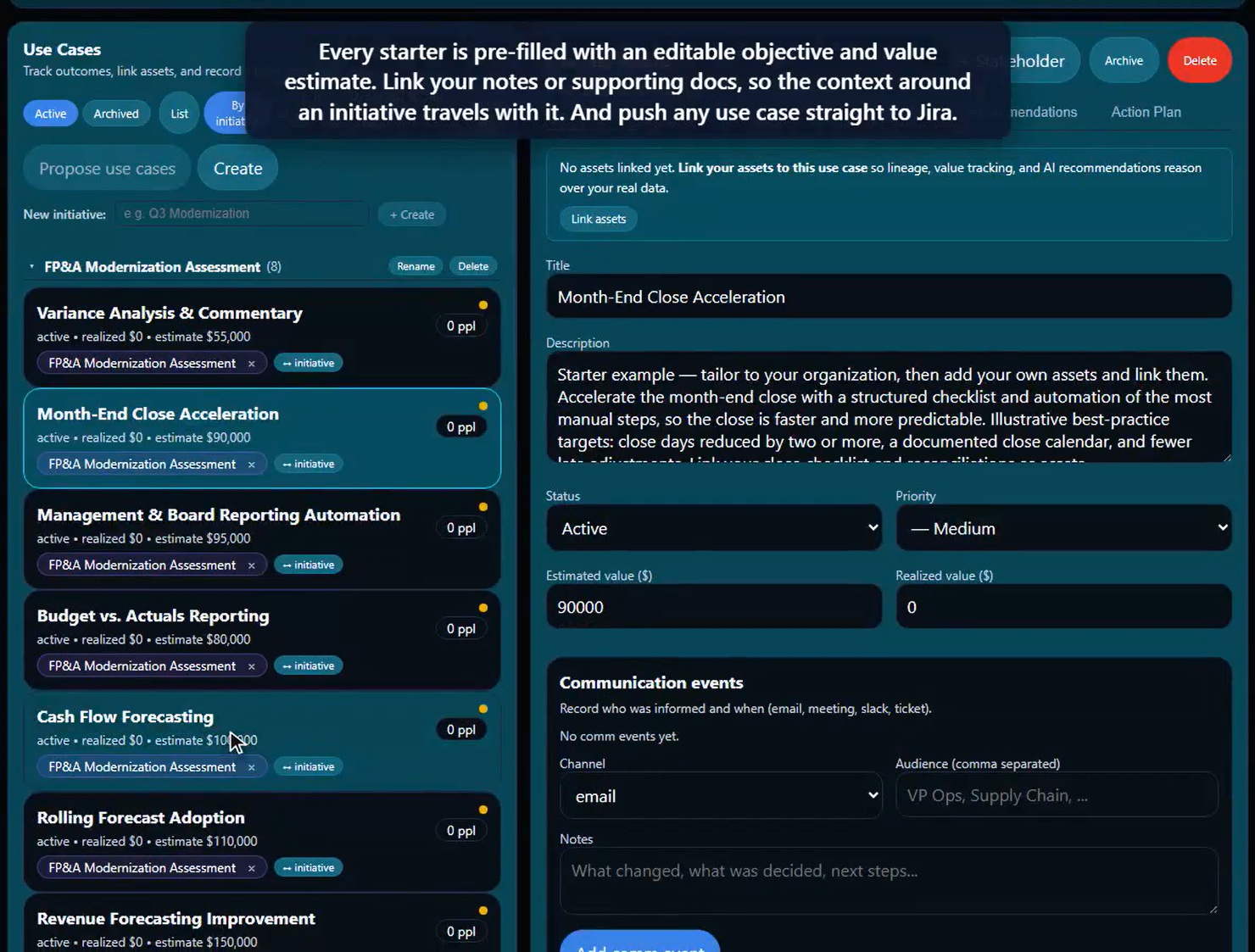
Each starter arrives pre-filled with an editable objective, a description, and an illustrative value estimate. These are examples to shape — not AI guesses, and not a finished analysis. Keep the ones that fit, delete the ones that don’t, edit freely.
Two things worth calling out:
- Solution Packs are free on every plan and cost zero AI credits. Activation just creates editable starter use cases — nothing is generated by AI, so there’s nothing to meter.
- Re-running a pack never duplicates. Come back later, add a new topic area, and only the new use cases appear. Delete a starter and want it back? Re-run restores it. You can explore without making a mess.
Packs come organized — meet Initiatives
Here’s the part that keeps your workspace from turning into a pile. When you activate a pack, its starter use cases don’t scatter into your existing list — they land grouped under an Initiative named for the pack.
An Initiative is a project or program that groups related use cases — the use-case counterpart of an asset group (which organizes your files). One use case belongs to one initiative, so your dashboard value roll-ups never double-count. And because initiatives are personal, your organizing scheme is yours — not something imposed on the whole team.
Once your work is grouped, the grouping does real work for you:
- Portfolio can filter to a single initiative — and the PowerPoint/PDF export honors the filter, so the deck you hand a stakeholder is exactly the on-screen view.
- Insights can focus on one initiative’s use cases.
- Every AI analysis — Propose use cases, the Leverage modes, the Workspace Agent, the Estate Assessment — can be scoped to an initiative, so you get a per-program read instead of a blended whole-workspace one.
A finance example, end to end
Picture an FP&A analyst on their first Monday with MyDataWork. They open the FP&A pack, choose Planning & Forecasting and Reporting & Close, and in a few seconds have four starter use cases — Headcount Forecast Modernization, Month-End Close Acceleration, and two more — already bucketed under an FP&A Modernization Assessment initiative.
They connect their real files — the forecast workbook, the close SQL, the exec dashboard — and link them to the starters. Now the initiative tracks against real assets. Friday afternoon, their manager asks for a portfolio update: they filter Portfolio to the FP&A initiative, export, and send a clean deck covering exactly that program — no manual trimming, no unrelated work bleeding in.
That’s the whole arc: from blank page → to a structured plan → to a stakeholder-ready story — in an afternoon instead of a quarter.
It’s not just finance
FP&A is the worked example, but the same pattern fits any data worker’s world. MyDataWork ships six packs today, each with its own topic areas and starters:
- FP&A Modernization — finance planning, budgeting, close, and data governance.
- Power BI Portfolio Review — rationalize a sprawling BI estate.
- Agentic Analytics Readiness — get your workspace ready for AI agents.
- Consulting Discovery Accelerator — run a per-client discovery in minutes.
- Alteryx Modernization Readiness — plan a migration off legacy workflows.
- Analytics Value Realization Review — prove the value you’ve already delivered.
Same mechanics every time: pick your areas, get organized starters under an initiative, tailor, and let the scoping do the rest. The muscle you build on one pack transfers directly to all of them.
Try it
Solution Packs are live on every plan, including the free 90-day Explorer trial, at no credit cost. Open Setup → Solution Packs, pick the one closest to your work, and start from a plan instead of a blank page.