
Understand your work. Explain its business purpose.
MyDataWork connects the assets you use to the outcomes you pursue. Catalog work across your existing tools, explore relationships, record stakeholders and value, and prepare the context for a team or leadership decision.
Organize the work
Bring connected dashboards, spreadsheets, scripts and cloud assets into one searchable catalog, so you can find the work and understand its context.
Explain the purpose
Link assets to use cases, owners, stakeholders, objectives, and the notes that lived only in people's heads.
Document the value
Keep estimated and recorded realized value alongside the use cases they describe. Prepare the evidence and assumptions for a review.
Prepare for AI
Choose the context an external agent can access over MCP, and plan agent workflows in Agent Studio before you build.
Dashboard
Review the summary of your visible work, then open the records behind it.
Assets
Catalog the files, queries, workflows, dashboards, and cloud objects that drive decisions.
Connectors
Index on-prem files and cloud data sources by metadata — via the Windows Connector and cloud connections.
Use Cases
Capture objectives, stakeholders, progress, notes, and value.
Lineage
Trace dependencies with evidence and confidence levels.
Portfolio
Select use cases and export their outcomes, assets and value context to PDF or PowerPoint.
Architecture & Value
Discuss the tools supporting your work using recorded value, relative utilization and relationship evidence. Team & Enterprise.
AI Analysis
Propose use cases, assess the estate, and prioritize next actions.
Agent Studio
Scope agentic use cases before implementation.
Workspace Agent
Review findings about your work and inspect the evidence before choosing an action.
Solution Packs
Start from ready-made use cases for common scenarios instead of a blank workspace — free on every plan.
Action Plans
Turn AI recommendations into tracked next steps — and push them to Jira.
A summary that leads back to the work
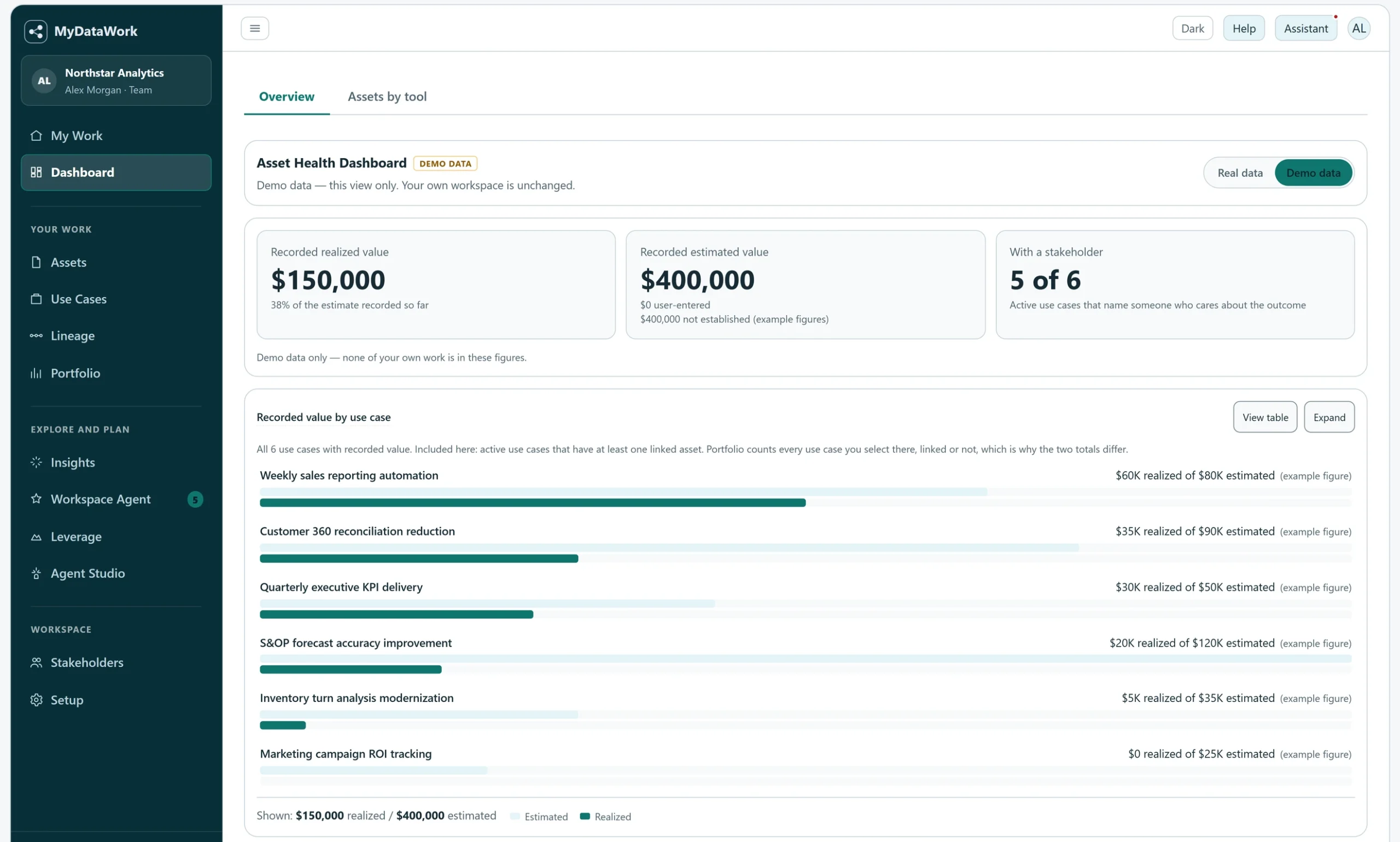
Use Dashboard to orient yourself across tools, assets and recorded value. Open the underlying records when a figure or relationship needs a closer look.
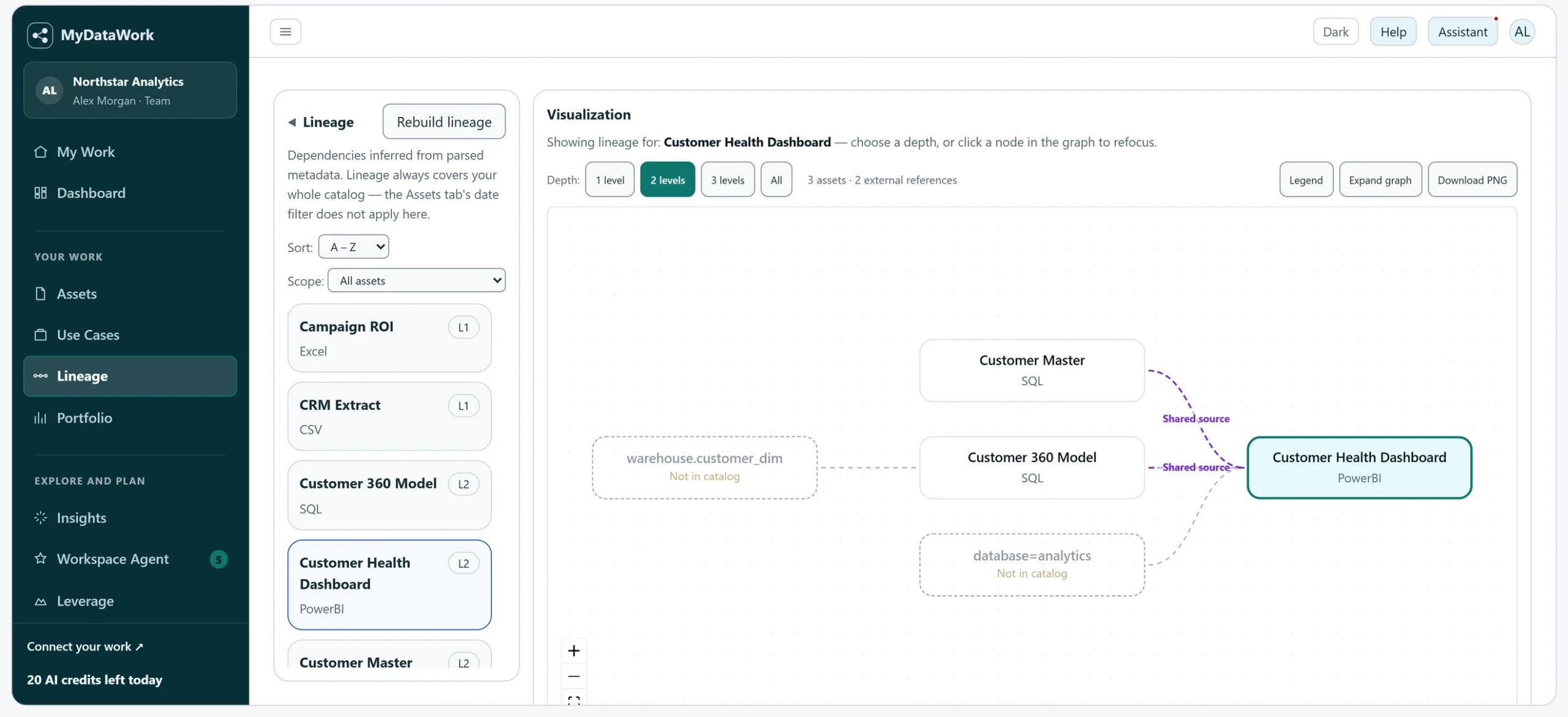
Understand the relationships behind a change.
Lineage brings recorded cross-tool relationships into view and shows the evidence behind them. A direct dependency differs from two assets reading the same source; references to uncataloged systems help identify what needs further investigation.
MyDataWork builds a catalog and the working context around it. The Windows Connector extracts structure locally; uploads and cloud sources are processed by the service. Metadata and authored context can still be sensitive, so use your organization's review process. Read the connection and access details.
A column called order_date, and the fact that it is a DATE. Never the dates inside it. Not one row.
Names, types, structure, relationships, when it changed, and what people wrote about it.
Business-data rows, query results and source file contents.
Every one of them describes itself in its own dialect, and none of them agree. A catalog that simply stores what each tool hands it ends up with a separate pile per source and nothing that can be compared across them. Making them comparable is the work, and it is the part nobody explains. Here is the same column, as six of our sources describe it.
| Databricks | name: "order_date" | type_text: "date" |
| Power BI | name: "Order Date" | dataType: "dateTime" |
| ThoughtSpot | name: "Order Date" | data_type: "DATE" |
| Sigma | label: "Order Date" | type: { "kind": "date" } |
| Looker | name: "orders.created_date" | type: "date" |
| A spreadsheet | { "Orders": ["order_date", "region"] } | |
Six sources, six shapes, one result. The name may come through as
name, label, columnName or fieldName. The
type as type, dataType, data_type, or buried in a nested
object. Each one maps to the same two fields, attached to a named asset. That is the whole
trick, and everything downstream depends on it.
Supported sources and file formats include Snowflake, BigQuery, Redshift, Databricks, Power BI, Tableau, Looker, Sigma, ThoughtSpot, dbt, Dataiku, Excel, CSV, Parquet, Avro and ORC. MyDataWork normalizes their metadata into a common structure that connects assets to the work they support.
Every source, however it phrases itself, becomes the same thing: a named column with a type, attached to a named asset.
MyDataWork holds this for every connected source: where each piece came from, how fresh it is, and, honestly, what a given source cannot publish. A CSV declares column names but no types, because the format has none. That is a fact about CSVs, not a gap in your catalog, and the page says so.
Give recurring work a business purpose.
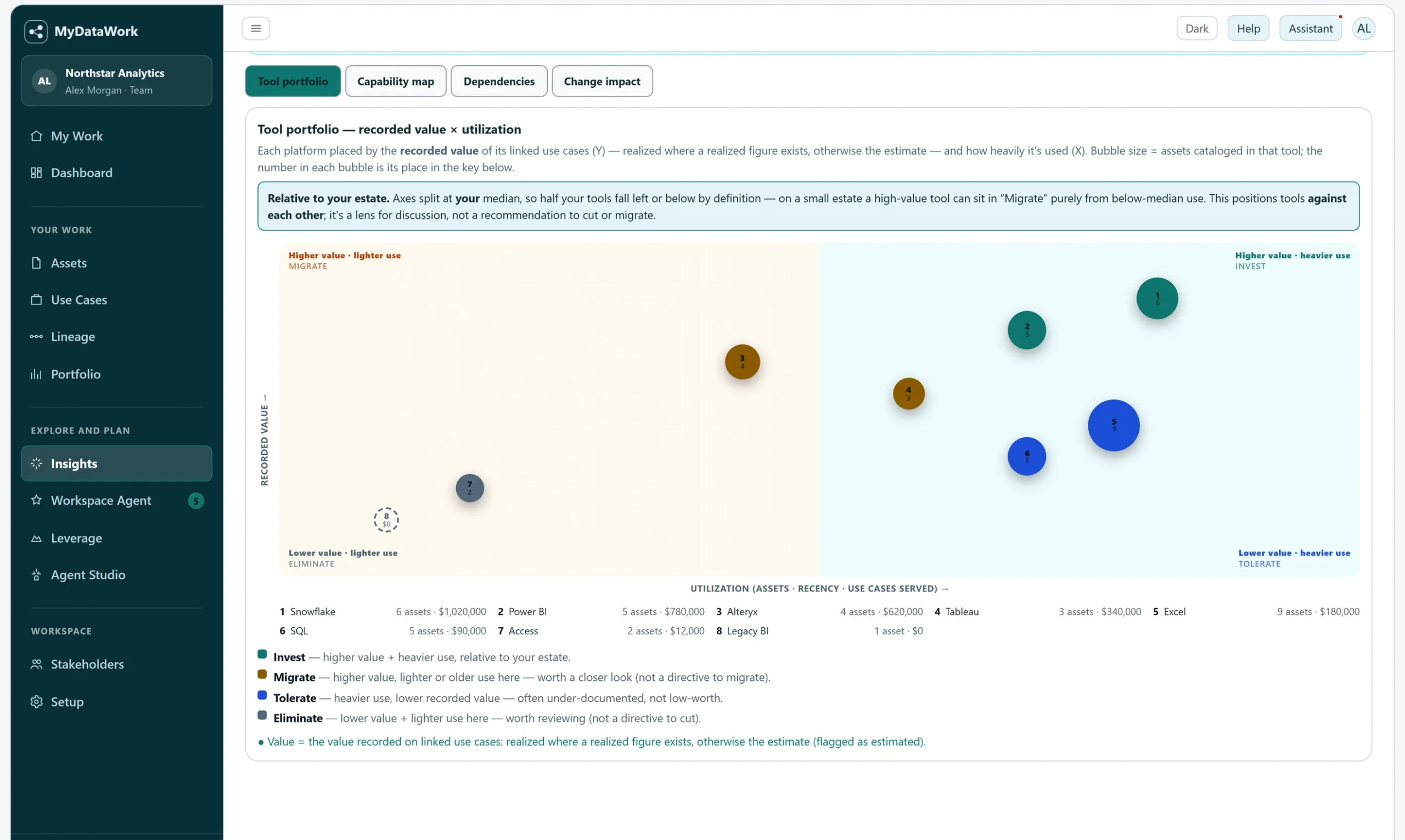
A use case connects an objective to its assets, stakeholders and progress. Record the context once, update it as work develops, and carry it into your next review.
- Objectives, stakeholders, notes, and progress
- Linked assets and dependencies
- Estimated vs. realized value
- Communication events — who was informed, and when
- Push next steps to Jira as an action plan
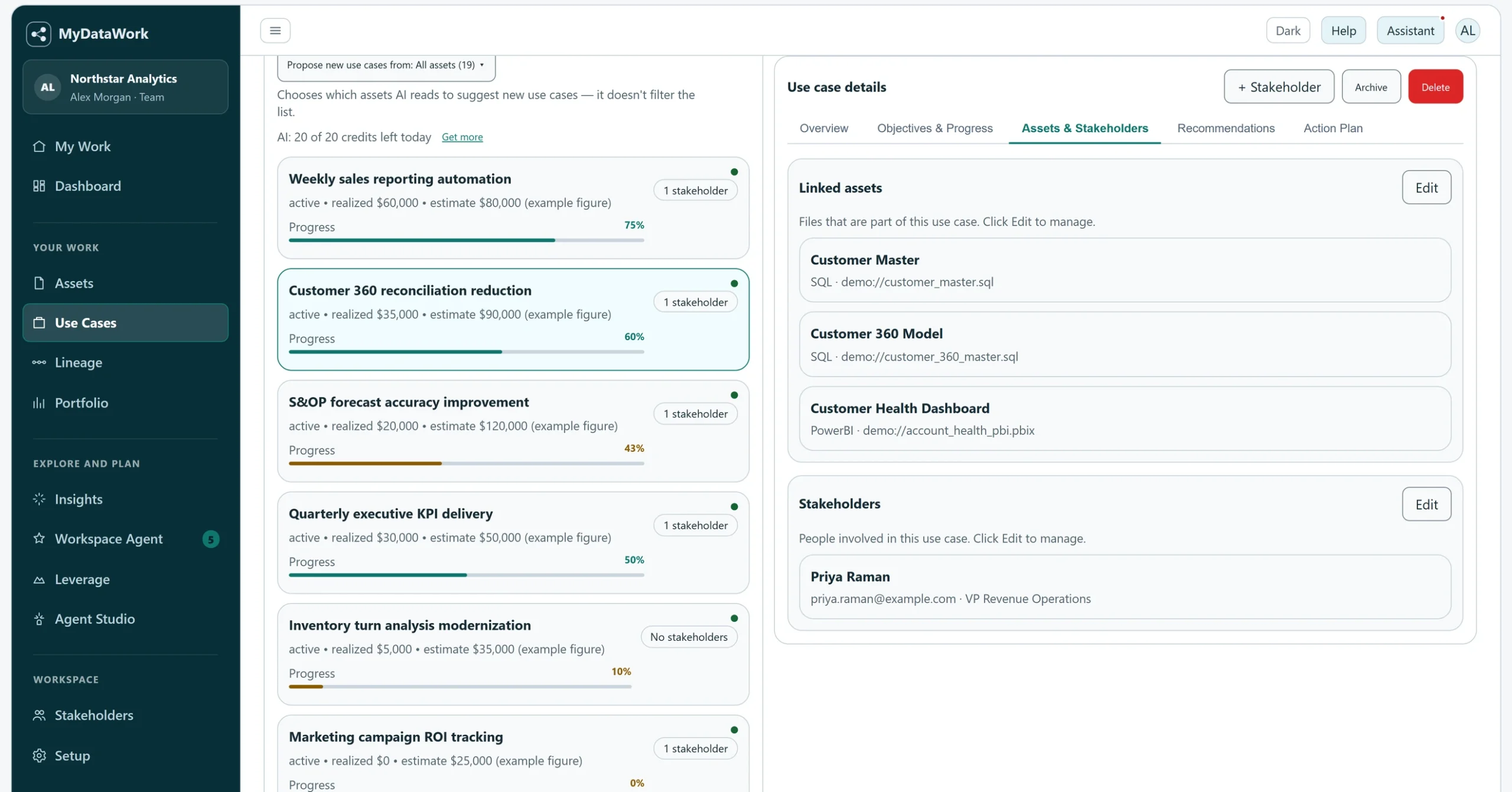
Bring analytical context into investment decisions.
Architecture & Value brings recorded value, tool utilization and relationship evidence into a credit-free leadership view. Compare tools relative to your estate and examine what they support before discussing change. The figures inform judgment; they are not audited returns or instructions to cut a platform.
- Tool portfolio — compare recorded value and relative utilization; the quadrants are discussion aids, not investment recommendations
- Capability map — value rolled up by business function
- Dependencies — inspect the recorded relationships connecting platforms to analytical work
- Change impact — the value and use cases that depend on any one tool, split by confidence
Use your authorized workspace context to explore use-case ideas, possible improvements and agent designs. Review suggestions against your own requirements before acting.
AI Assistant
An always-available assistant on every screen — ask questions, get recommendations, and act on your workspace.
Workspace Agent
Review findings and supporting evidence to decide which gaps or changes deserve attention.
Migration Assist
Explore a modernization approach using the documented assets, relationships and use-case context. Validate the plan in your implementation environment.
External data
Explore public datasets and marketplace listings that may fit your use cases. Review the app's metadata-based fit and readiness information, and the displayed cost before running an analysis. A suggested recipe is for you to review and run in your own environment; MyDataWork does not perform the join or prove it will work on your rows.
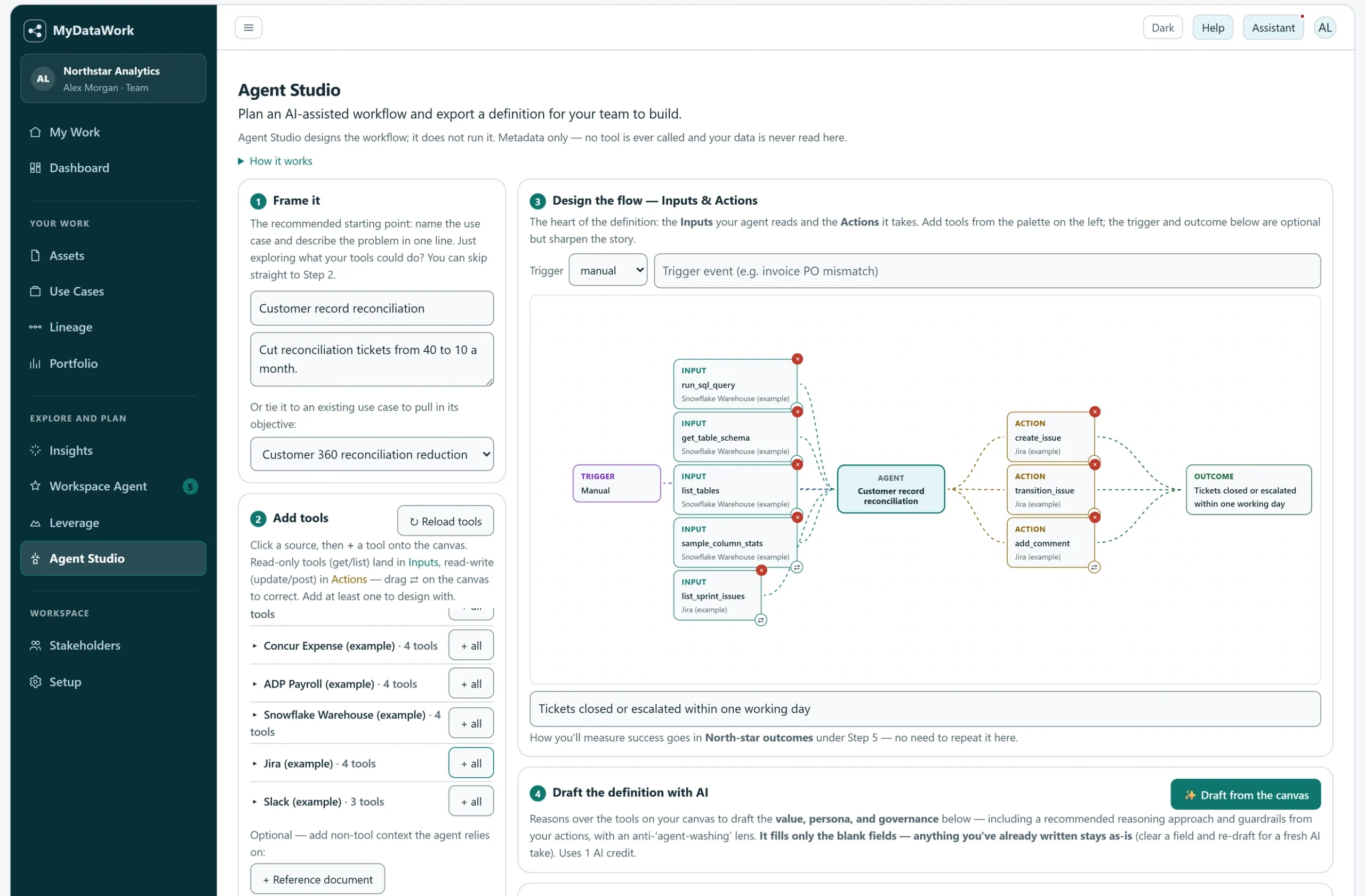
Agent Studio
Define the trigger, inputs, agent role, actions, outcomes, guardrails, and handoff — then export a shareable spec.
Agent Access
Grant an external agent access to selected asset metadata and use-case context over MCP. Review the context you expose: authored text and metadata can contain sensitive information.
Solution Packs load ready-made use cases for common scenarios — a structured plan you adapt to your work. Free on every plan.
Explore Solution Packs →Rationalize a reporting estate
Modernize legacy workflows & spreadsheets
Run planning & forecasting as a governed portfolio
Document the analytics team's value
Cloud warehouses
Snowflake, BigQuery, Redshift, Databricks.
BI & dashboards
Power BI, Tableau, Looker, Sigma, ThoughtSpot.
Transformation & pipelines
dbt, Alteryx, Dataiku.
Notebooks & code
Python, SQL, GitHub.
Spreadsheets & files
Excel, CSV, and the workbooks where real work happens.
Synced cloud-drive folders
Catalog supported files in locally synced folders with the Windows Connector.
For the analyst
Find your work, understand what belongs together, and keep its purpose and progress ready for the next handoff or review.
For the team
Share selected assets with members of your workspace. Use Portfolio exports to communicate selected use cases; ordinary members do not directly share use-case records. Administrators can inspect individual member records through the audited Workspace view.
For leadership
See the use cases, dependencies and recorded value behind a priority or investment discussion.
Connect analytical work to agency outcomes.
Give analysts, program teams and leaders a shared understanding of the reports, models and workflows behind agency decisions—and the priorities they support.
MyDataWork for AWS GovCloud (US) brings that workspace to AWS GovCloud, with agency-focused starter use cases you can adapt to your mission. Available through AWS Marketplace.
Explore the GovCloud edition and walkthrough →A starting point for agency priorities
The Agency Operations & Public Outcomes Solution Pack includes 16 editable starter use cases across four areas:
- Program Delivery & Grants
- Citizen Service Delivery
- Oversight & Transparency Reporting
- Workforce & Capability
Choose the areas that matter, adapt the objectives and value assumptions, then connect the analytical work behind them.
Asset Health Dashboard
A 10-second read on the estate.
Agent Studio
Scope an agentic use case — no code.
Solution Packs
Start from a plan, not a blank workspace.
Estate Assessment
An AI read on what to fix first.
Use an enterprise data catalog for governed data discovery and MyDataWork for the analytical work around it. Connect a practitioner's assets to objectives, stakeholders, progress and value, while retaining your existing governance and analytical tools.
Try the workflow with one use case.
Explorer is free for 90 days, with no credit card required. Begin with sample data or connect your work, then link an asset to an outcome and explore the resulting context.
Stay informed
