
Connect analytical work to business outcomes.
Bring assets, relationships, stakeholders and use cases into one place. Organize your analytical work, explain what it supports, and give leaders the context to discuss value and priorities—all while using the tools you already have.
Start with your goal. See how the work connects.
Start with what you want to accomplish.
Organize your work, improve a process, or show its value. Explore with sample data or connect your own sources.

Know what the work is for.
Connect the business objective, the person who depends on it, and the progress you record.


Bring the supporting assets together.
Six assets across Power BI, SQL, CSV, Excel, Python and Alteryx, linked to the same business purpose.


See how the work connects.
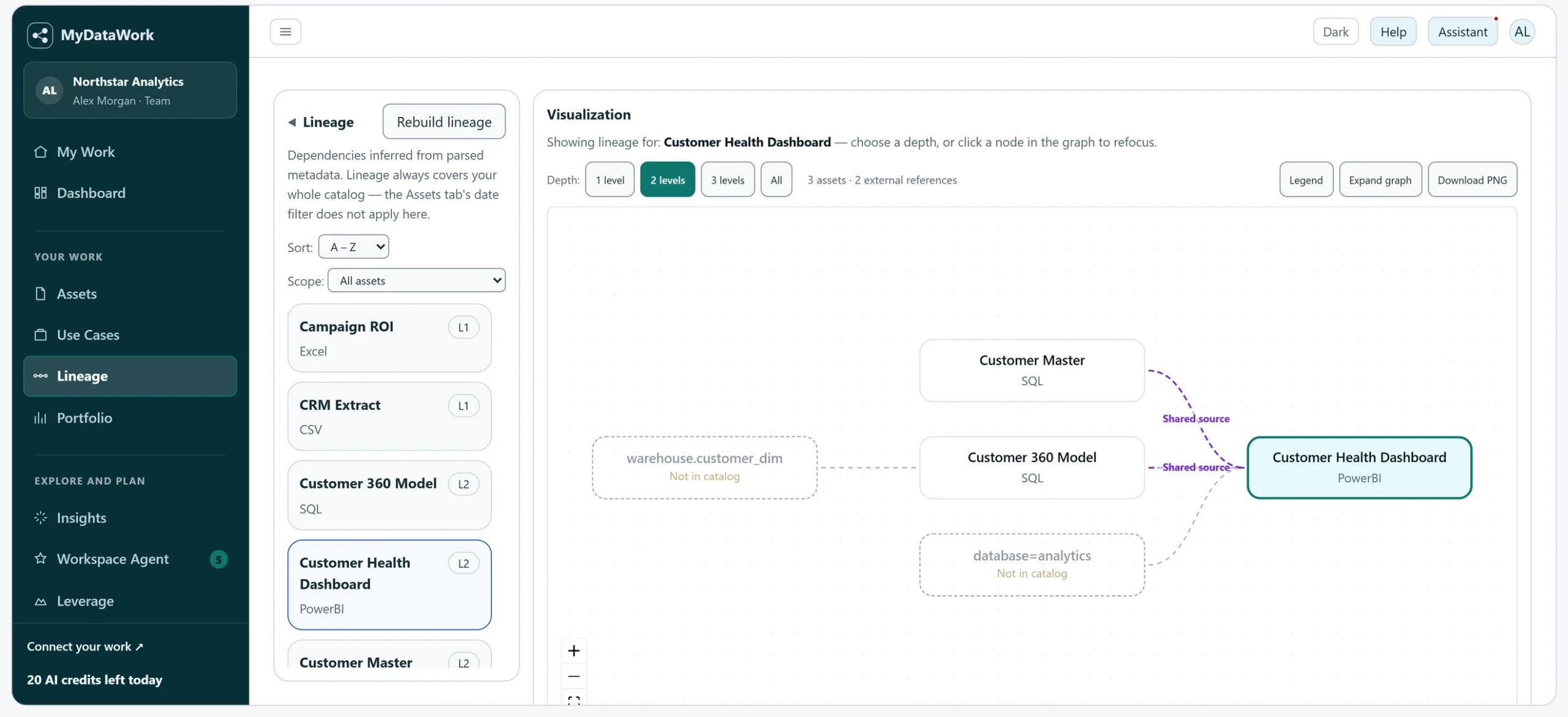
Inspect recorded relationships and their evidence before planning a change. Confirmed, likely and shared-source links stay distinct.

Data analysts
Analytics leads
Data & platform leaders
Business & AI leaders
What's missing
Your tools produce the analysis. Connect the story behind it.
Your analysis gets done across spreadsheets, SQL, notebooks, dashboards, workflows, and cloud platforms. Each tool knows something about the work inside it.
A dashboard shows a result. It may not explain which files support it, who depends on it, or why it matters. MyDataWork connects those details so the next review, handoff or change starts with context you have already recorded.
Keep doing analysis in your existing tools. Give its purpose, relationships and outcomes a place to stay connected.
From scattered assets to work you can explain.
Start with one use case and the assets behind it. Build the picture as your work develops, rather than reconstructing it before each review.
Find the work
Search the work you have connected across tools. See what each asset is, when it changed, and the use cases linked to it.
Open it where it lives
Inspect an asset's context, then use its available opening control to return to the source. Local opening requires the connector and access to that file on your computer.
Check what depends on it
Review the recorded relationships and their evidence before changing an asset. Distinguish direct dependencies from assets that share a source.
Update the outcome
Record the objective, stakeholders, progress and value of the use case. Keep the business reason alongside the assets that support it.
Prepare for review
Select use cases for a Portfolio export. Bring their outcomes, linked assets and value estimates into the leadership conversation.
One working record. A broader view for decisions.
The context useful to an analyst also helps a leader understand priorities, dependencies and the work behind recorded value.
That same context helps you plan AI initiatives. Document a workflow, identify its inputs and boundaries in Agent Studio, and choose what an external agent may access through MCP.
Organize the work
Find the assets you connect across tools and see the work they support.
Explain the purpose
Link assets to use cases, stakeholders, objectives, and the notes that lived in people's heads.
Document the value
Keep estimates and recorded realized value distinct. Explain your assumptions and bring the supporting context into reviews.
Prepare for AI
Choose the context an external agent can access over MCP, and plan agent workflows in Agent Studio before you build.
Asset Catalog
Find connected reports, files, queries and workflows in one catalog.
Lineage
Understand recorded relationships and their supporting evidence.
Use Cases
Tie work to business objectives, stakeholders, and outcomes.
Value Portfolio
Bring use cases and recorded value together for priority and investment discussions.
Agent Studio
Define, scope, and plan agentic use cases before you build.
Workspace Agent
Review findings and their evidence to decide what deserves attention.
See how it all connects
Follow relationships across tools, inspect references to systems outside the catalog, and understand which use cases may be affected by a change.
Already use an enterprise data catalog? Add a workspace for practitioners to document the purpose, stakeholders and outcomes around analytical assets. See how MyDataWork fits →
Individual work, clear oversight
Members have their own working views and can share selected assets with colleagues. Workspace administrators can access individual member records through the audited Workspace view.
Share & reuse
Share an asset with the team so colleagues can make an independent copy for their work. Communicate selected use cases through Portfolio exports; ordinary members do not directly share use-case records.
Clear access and accountable teamwork
Team metrics summarize adoption and reuse. Administrators can also inspect individual records through the audited Workspace view. Agree what information belongs in a workspace before inviting people from another organization.
Solution Packs provide starter use cases you can adapt to a reporting, modernization or planning challenge. Example estimates remain distinguishable from your own figures.
Explore Solution Packs →Rationalize a sprawling reporting estate
Bring scattered reports into view and review their ownership, relationships and purpose before deciding what to consolidate.
Modernize legacy workflows & spreadsheets
Examine the dependencies and business context behind a proposed migration, consolidation or retirement.
Run planning & forecasting as a governed portfolio
Connect planning models to their drivers, stakeholders and documented outcomes.
Document the analytics team's value
Give leadership a clear account of estimated and recorded realized value, with the use cases behind the figures.
What does MyDataWork catalog?
Asset names, types, structural references and relationship evidence, plus the use cases, notes, stakeholders and outcomes you choose to record.
Does MyDataWork read my file contents or data?
The Windows Connector opens supported files on your computer to extract structural metadata. Uploads and connected cloud sources are processed by the service. The catalog retains extracted metadata and the context you enter, rather than a copy of your source files. See what each connection accesses and retains.
How does AI work in the product?
AI can suggest use cases, recommendations and next actions from authorized asset metadata and the context you enter. Review suggestions before acting; the app shows the applicable cost before a run. Agent Studio plans an agent workflow—it does not execute it.
Which tools and file types are supported?
Warehouses, BI and dashboards, transformation and pipelines, notebooks and code, spreadsheets and files — the tools analytics teams already use. The Windows Connector can also catalog supported files in locally synced cloud-drive folders. See the full list on the Product page.
Start with one outcome. Build the picture around it.
Try Explorer with sample data or connect your own work. Link an asset to a use case, record its purpose, and see how that context supports your next decision.
Stay informed
