
Everyone is racing to give AI agents more autonomy. The hard part isn’t wiring an agent to tools — it’s deciding which agentic use case is worth building, which systems it needs, and what guardrails keep it safe. Agent Studio is the place you answer those questions, from the systems you already work with, before anyone writes a line of agent code.
Addressing the gap before the runtime
Industry guidance has converged on a clear message about the Model Context Protocol (MCP): don’t let agents connect straight to MCP servers. Govern every connection at a control point — validate what’s in your registry, enforce identity and policy, and audit every call before a tool is ever invoked. Gartner urges software and security leaders to adopt MCP gateways — to enforce authentication and policy and gain visibility into agent behavior — rather than letting agents connect to servers directly.
That guidance is right — and it’s about the runtime: the moment an agent actually calls a tool.
But there’s a step upstream of the runtime that nobody governs: deciding whether an agentic use case is worth building at all, which of your systems it should touch, and what oversight it needs. Most teams can’t answer that crisply. Agent Studio is that upstream step. You scope the use case — metadata only, from any MCP source you can access, including the systems you already catalog in MyDataWork — and export a shareable use-case definition for the team that will build and govern it.
To be precise about the boundary: Agent Studio is not a control point and does not verify that a server is safe. It scopes and hands off; your gateway governs the runtime. Scope in Agent Studio; govern the runtime in your control point. The two are complementary.
The model, in one line
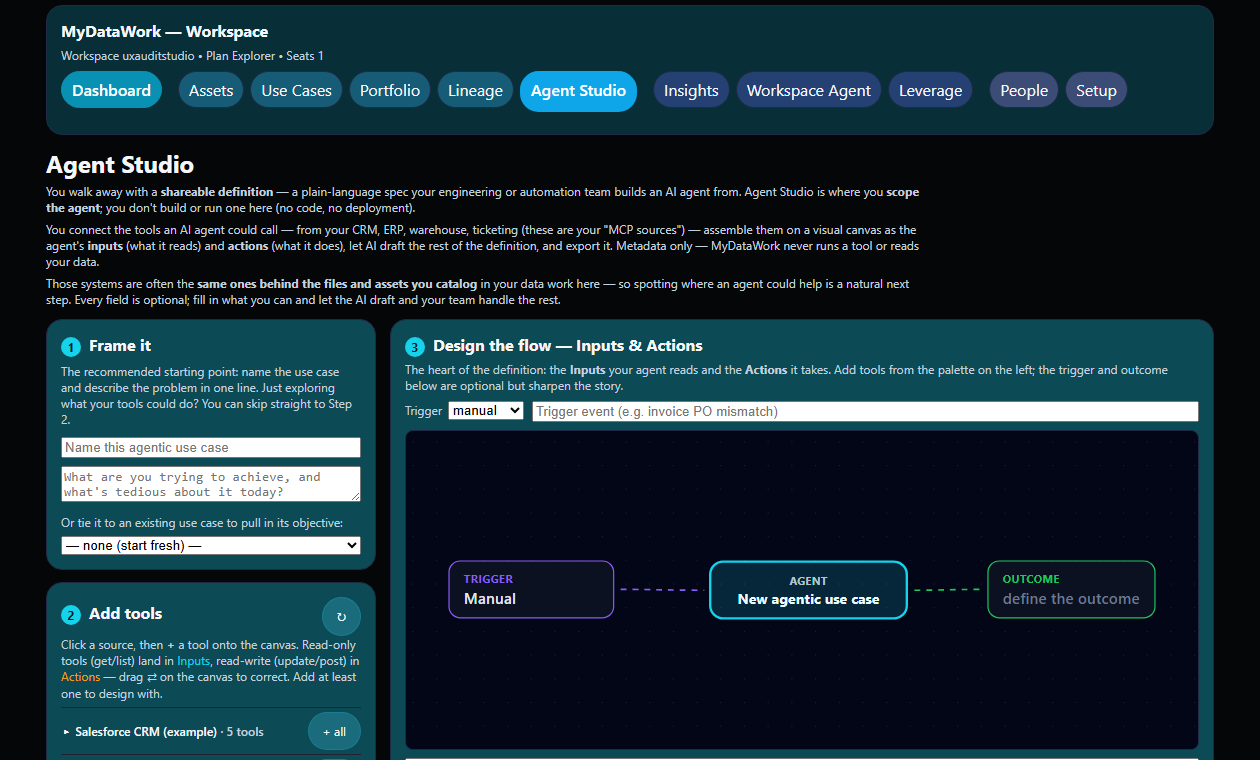
Connect the tools an agent could call (your MCP sources) → assemble them as Inputs and Actions on a canvas → let AI draft the rest → export a definition. Same shape MyDataWork already uses for your data work — catalog, use case, value — now pointed at your agents.

And, as everywhere in MyDataWork: metadata only. We never run a tool, read a resource, or see a data value.
What we actually read from an MCP source
Because “we connect to your systems” makes people (rightly) nervous, here is exactly what enters MyDataWork — and what never does.
An MCP server advertises tools (actions it can perform), resources (data addressed by URI), and prompts. Agent Studio catalogs the structure only. For each tool we store its name, its description, and the shape of its input parameters — the parameter names, their types, and which are required. That’s it. We never call the tool, never read a resource, and never see a value.

Here’s the complete stored record for a single tool — the real shape from our catalog:

And the source-level envelope we keep alongside it — no secrets, no data:
server_name, server_version, protocol_version, auth_mode, capabilities, counts, cataloged_at, reachable
That’s the whole footprint. A tool’s name and input shape are just enough to design with — to reason about how the pieces fit toward a goal. Which is precisely why scoping here is safe by construction.
A worked example: reverse-engineering a real deployment
The most useful way to see Agent Studio is against a real, documented pattern. Month-end close is a good one: finance teams are deploying agents that run continuous reconciliation across the general ledger, sub-ledgers, banking, and expense and payroll systems; draft recurring journal entries; and generate variance narratives — with a human reviewing and approving before anything posts. The Corporate Finance Institute documents this deployed pattern in detail, and an MIT/Stanford study reports AI cutting monthly-close time by roughly 7.5 days.
We didn’t create or run that close agent — but here’s how you’d have scoped it in Agent Studio: metadata only, before a line of code:
- Frame it. One line: “Close the books faster — reconciliation and variance drag the close to six-plus days.”
- Add tools. Bring in the finance estate as MCP sources — an ERP/GL source, a banking source, an expense source, a payroll source — and pick the tools each exposes (balances, statements, transactions, journal drafts).
- Design the flow. Lay the tools onto the canvas as Inputs and Actions, with a trigger (period-end) and the outcome (a reconciled, review-ready close).

- Draft with AI. Agent Studio reasons over those tools and drafts the definition: a persona (a reconciliation agent that investigates and explains breaks), a reasoning approach, and — the part that matters most in finance — governance: human-in-the-loop, nothing posts without approval, with hard guardrails the agent may never cross. It also applies an anti-“agent-washing” check: where a step is deterministic and a rule would do, it says so instead of forcing an agent.

- Share it. Out comes a definition your team can act on — the spec plus a flow diagram.

The other way in: start from a use case you already track
If the agentic work maps to a goal you’re already managing in MyDataWork, start there instead. Pick the use case — its objective seeds the definition — then bring in the tools from the systems behind it.

What you hand off — and the bridge to runtime governance
The exported definition (PDF or PPT — the spec and the flow diagram) is the brief your engineering or automation team builds from. It closes with a “Before you build” hand-off that draws the line cleanly between where scoping ends and runtime governance begins:
- Route runtime tool access through your governed MCP control point — validate each source (identity, allow-list, audit) before any tool is invoked.
- Confirm each tool actually does what its metadata claims.
- Confirm an agent is genuinely warranted for the job.
That’s the explicit bridge: you scope with us; you govern the runtime at your control point. Agent Studio never claims that role, and never claims a server is safe — it hands you a definition and points you at the layer that does.

See the video of this use case on YouTube for a two minute walkthrough here.
Safe by construction
Agent Studio is deliberately honest about what it is: a way to design an agentic use case, not to run one. That honesty is also its safety story — metadata only, so none of the runtime risk; your own systems, not an uncurated public registry; and a definition your team validates before it builds. For data workers, it’s a new way to add value to the agentic push inside your company: you already know the systems, the data, and the goals — Agent Studio turns that knowledge into a plan the whole team can act on.
Try it in Agent Studio, or load the example sources to see the flow end to end.
