
Turn analytical context into better-informed decisions.
Start with a question your team needs to answer: what supports this report, what should we modernize, or how do we explain the value of our work? MyDataWork brings the assets, relationships and use cases behind that discussion together.
Nobody's sure which dashboards and reports still matter — or who owns them.
Business-critical logic is trapped in fragile spreadsheets and aging tools.
Planning models are scattered, and their drivers live only in people's heads.
Leadership can't see what the analytics team's work is actually worth.
You want to use AI, but pointing it at undocumented work is risky.
When someone leaves, the context behind their work leaves with them.
Choose a starting problem. Adapt a relevant Solution Pack or create a use case around your own objective.
Rationalize a sprawling reporting estate
Dozens of overlapping dashboards, no clear owners, and no idea which are still used.
Review reports alongside their owners, use cases and recorded relationships. Use that context to discuss consolidation; Architecture & Value adds a relative view of the tools involved.
Modernize legacy workflows & spreadsheets
Critical logic is buried in brittle spreadsheets and legacy tools no one wants to touch.
Document the assets, dependencies and outcomes behind a modernization proposal, then review suggested next steps before implementation.
Run planning & forecasting as a governed portfolio
FP&A models, drivers, and owners are scattered, and no one can audit how value was estimated.
Keep models, stakeholders, objectives and recorded values connected in a portfolio you can revisit and explain.
Document the analytics team's value
The team does valuable work, but leadership can't see it — so budget and headcount are at risk.
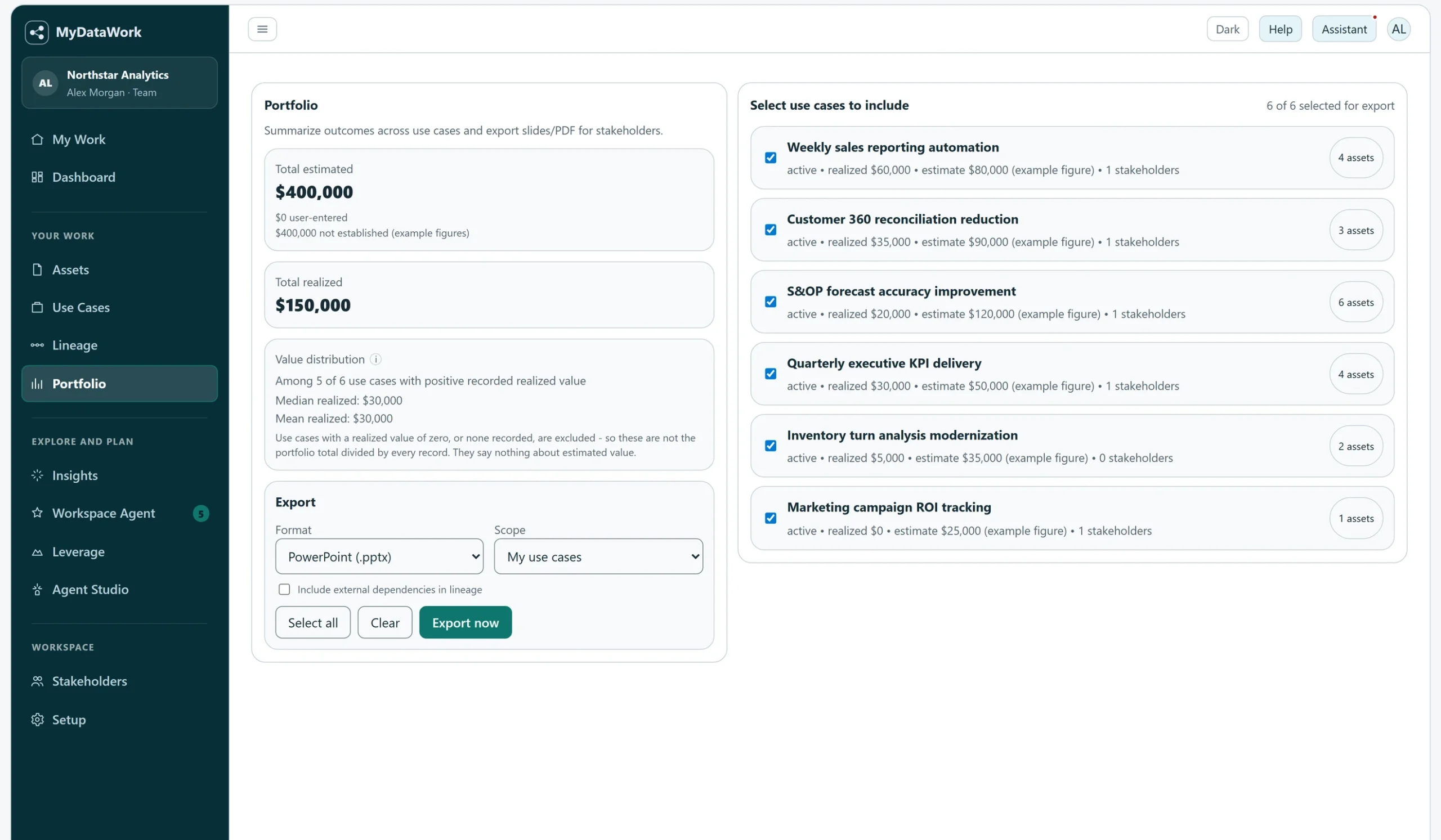
Bring selected use cases into a leadership review with their linked assets, estimated value and recorded realized value clearly distinguished.
Get AI- and agent-ready
You want to apply AI, but pointing it at undocumented, unowned work is risky and unreliable.
Document the purpose, inputs and boundaries of a proposed agent workflow before building it. Choose the context external agents may access.
Keep the context when people leave
When an analyst moves on, the "why" behind their dashboards and models walks out the door.
Keep the documented purpose and relationships alongside the work, so a handoff has more to rely on than a folder of files.
Defend the tools your work depends on
A license review or rationalization push starts, and the tools your team relies on get judged on cost alone — with no record of what they actually support.
Show which use cases and recorded values are linked to a tool before discussing its future. MyDataWork supplies context for the decision, not license-cost data or a predicted saving.
Connect individual work to team priorities
Analysts need a useful place to organize their work; leaders need enough context to discuss ownership, reuse and priorities.
Members can share selected assets and reuse independent copies. Team metrics summarize adoption, while administrators can also inspect individual member records through the audited Workspace view. Make those access expectations clear before adding colleagues or external collaborators.
Use asset groups to organize files and initiatives to organize use cases by project or client. Where a screen offers a scope selector, choose the relevant group or initiative and confirm the population shown before running or exporting. These organizational labels are not confidentiality boundaries; use separate workspaces when information must be kept apart.
A group per client
Organize an engagement’s assets and use cases, then review the selected scope before sharing a report. Use separate workspaces where client confidentiality requires an access boundary.
A group per project
Keep a migration, a rebuild and business-as-usual apart, so recommendations speak to the work in front of you rather than the whole estate.
Roll it back up
Groups organize work and scope supported views; they do not create an access boundary or hide assets from people who can already see them. Check each view’s selected scope and use the appropriate workspace and sharing permissions for confidentiality.
Value made visible, not assumed
Every scenario lands in the same place: an organized estate where each piece of work has an owner, a purpose, and a number next to it — ready to report up and act on.
Start with editable use cases, then connect your own assets, objectives and evidence. Activating a pack uses no AI credits.
FP&A Modernization
Planning, forecasting, and management reporting run as a governed portfolio.
Power BI Portfolio Review
Rationalize a Power BI estate — find redundancy, ownership gaps, and stale reports.
Agentic Analytics Readiness
Scope and define agentic use cases before you build them in Agent Studio.
Consulting Discovery Accelerator
Organize client analytics work, deliverables, and value across engagements.
Alteryx Modernization Readiness
Inventory Alteryx workflows and plan migration, consolidation, or retirement.
Analytics Value Realization Review
Stand up an estimated-vs-realized value program across the analytics team.
Agency Operations & Public Outcomes
Connect analytical work to agency priorities. Choose relevant topic areas, adapt the starter use cases and link your own assets and evidence.
- Program Delivery & Grants
- Citizen Service Delivery
- Oversight & Transparency Reporting
- Workforce & Capability
Start solving today.
Try the commercial service with the free 90-day Explorer trial. Explore sample work or bring in your own assets within the plan’s limits—no credit card required.
Stay informed
