
A consumer goods manufacturer runs a holiday promotion with a retailer in its West region. The promotion is funded through November. Now the retailer wants to keep it running through December, and the manufacturer’s account manager has a review with them on Thursday.
Saying yes isn’t a pricing detail. It commits the brand to another month of promotional funding, and that is finance’s call, not the account manager’s.
Has finance approved December?
The account manager has the opportunity in Salesforce. The demand planner’s Tableau view includes a December scenario, so the team can explore what another month would look like. But a scenario shows what would happen if the promotion ran longer. It doesn’t say anyone has approved the money. Finance decides whether to fund the extension. The demand planning analyst explains what that decision means for the retailer.
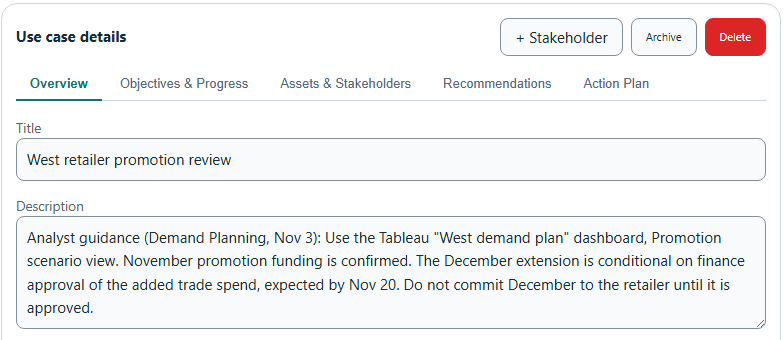
In MyDataWork, the analyst writes the funding status on a use case, “West retailer promotion review”, next to the Tableau view it applies to. In our test the guidance read: November funding is confirmed; December is conditional on finance approval, expected by November 20; don’t commit December to the retailer until it’s approved.
What the account manager sees
A custom Salesforce action lets Agentforce read the guidance an analyst shares through MyDataWork’s MCP service.
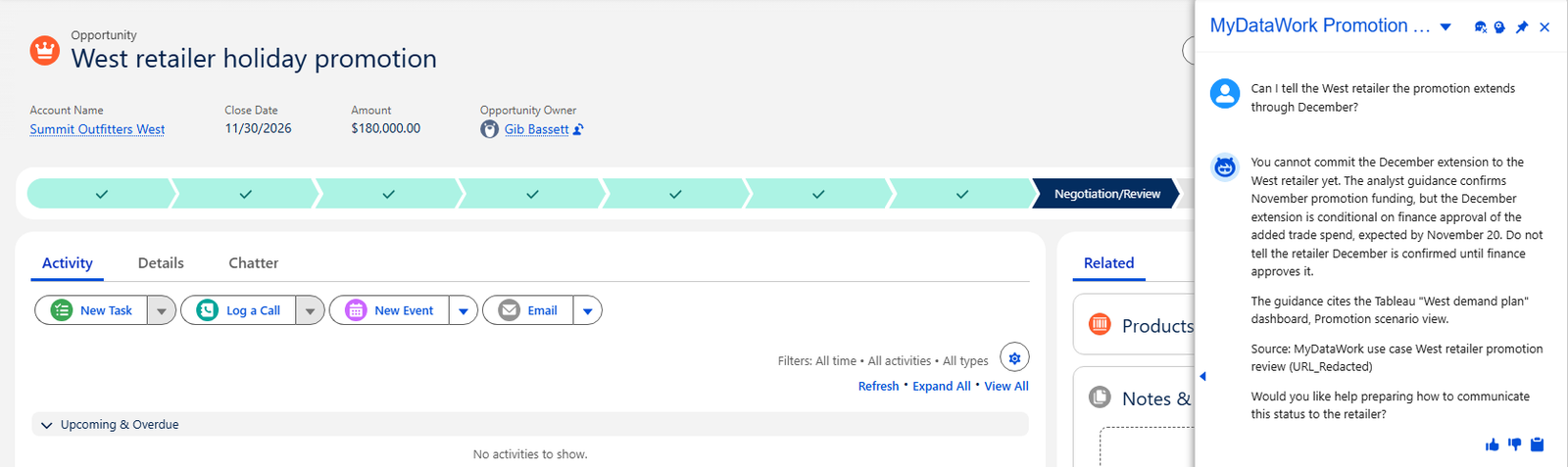
The account manager asks Agentforce in Salesforce: “Can I tell the West retailer the promotion extends through December?” The answer comes back with the analyst’s guidance: November is confirmed, December still needs finance approval, and the Tableau “West demand plan” dashboard’s Promotion scenario view is the one to use. It also names the MyDataWork use case the guidance came from. In our demo org, Salesforce’s trust layer replaced the link itself with “URL_Redacted”, so a reader with MyDataWork access can find the source by its use-case name.
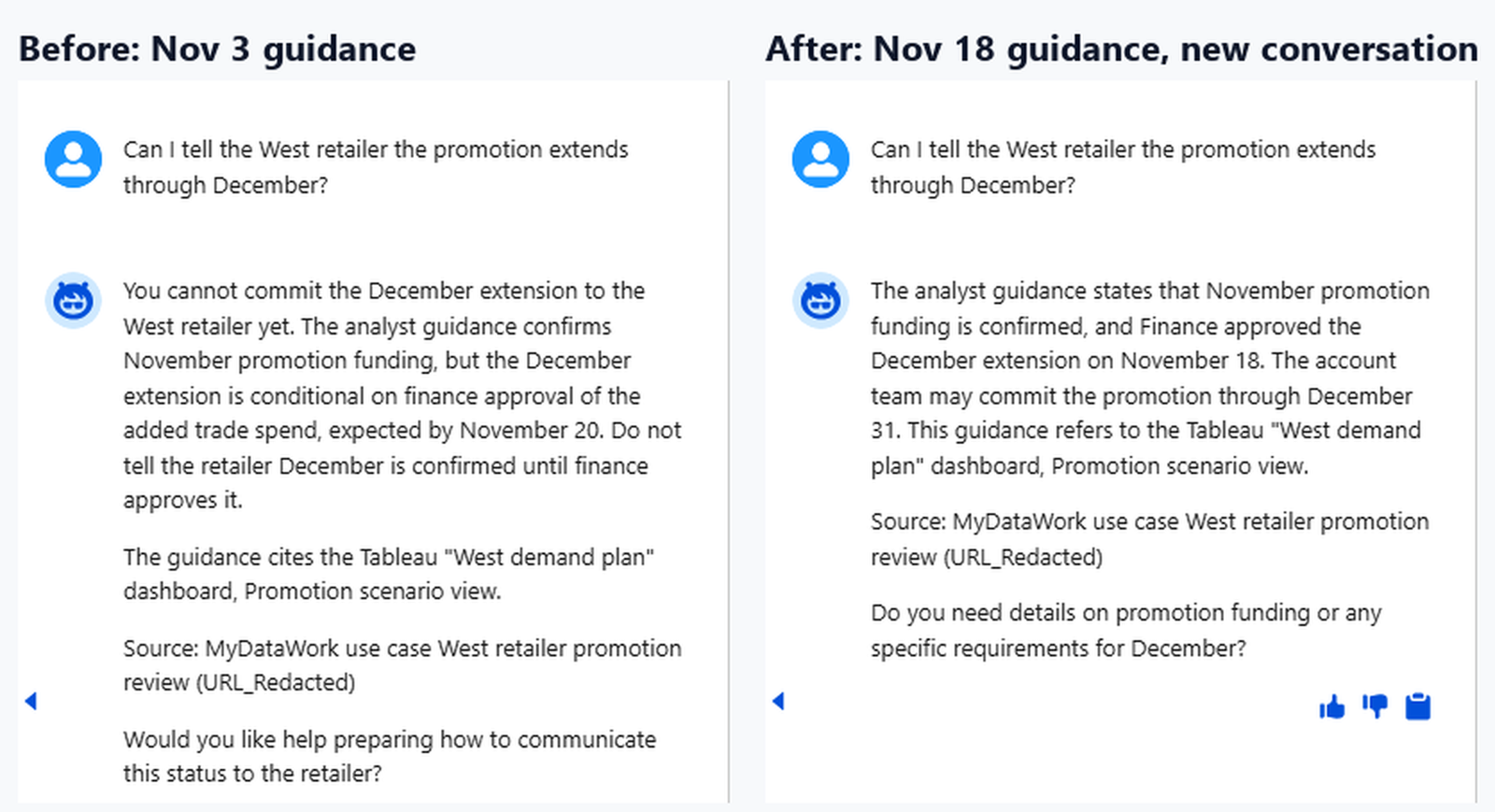
When finance approves December, the analyst updates the use case in MyDataWork and saves it. The account manager asks the same question in a new Salesforce conversation, and this time the answer is yes: the promotion is approved through December 31. The earlier conversation still contains the earlier answer. The custom action retrieved the updated guidance when the account manager asked again.
Who does what
The analyst, in MyDataWork:
- Records the guidance on the use case and keeps it current as decisions are made.
- Links the analytical assets the guidance depends on. In this test that was one Tableau workbook, West_demand_plan.twb. On another promotion, an analyst might also link a trade-spend workbook or an extract supplied by the finance team.
- Creates a read-only key for the Salesforce connection and shares only this use case with it. Withdrawing the share, or revoking the key, stops the next read.
The Salesforce administrator:
- Adds a small custom action to an Agentforce agent. The action calls MyDataWork’s MCP service through a Named Credential, and Salesforce stores the key, so it never appears in code or in the conversation.
- Decides who can use the agent, with a Salesforce permission set. In our test, Jordan, a colleague without the permission set, couldn’t select the agent.
Who controls access
Sharing starts inside MyDataWork. The analyst gives the Salesforce connection permission to read the West retailer use case. That selection determines what guidance the connection can retrieve. A separate choice in Salesforce determines which employees can ask the agent for it.
- MyDataWork controls what can be read. The key sees only the use cases the analyst shares with it. It returns the use case’s description and objective, and metadata about the linked assets, such as names, systems and source table references. It doesn’t return data rows or files. Whatever the analyst writes in the description is returned as written.
- Salesforce controls who can ask. In this setup, every permitted Salesforce user reaches MyDataWork through one shared connection. MyDataWork doesn’t see individual Salesforce users, so access for individual people is managed with Salesforce permission sets.
We tested those controls separately. Jordan could not select the agent in Salesforce. The permitted user could still ask it a question after the analyst removed the use case from the connection in MyDataWork, but the next request returned no guidance.
When a simple link is enough
You don’t always need an integration. If the question comes up once a quarter, a link to the dashboard and a note in the opportunity may be all you need. Consider what happens when finance changes its answer the evening before a retailer review. If the analyst maintains the guidance beside the analytical work in MyDataWork, the account manager can ask again from the opportunity. The analyst has one place to update the guidance, and the account manager learns both what the brand can promise and which Tableau view explains the plan.
Where else could this help?
Other account teams face similar questions: which forecast should we quote, and has the price exception been approved? Each time, the useful answer is the one someone can trace back to a decision. The same question could matter in finance planning, for a controller preparing a forecast in SAP: which assumptions has finance approved for the base forecast?
This walkthrough uses a Salesforce Developer Edition org and a MyDataWork test workspace with synthetic data. It is not a Salesforce product listing or endorsement.
