One workspace for the files, use cases, and outcomes behind your data work
Catalog the work behind your data, connect it to business value, and let AI surface what to automate, add, or modernize — all in one place.

Overall Asset Health
Open on where your work stands — not a folder of files
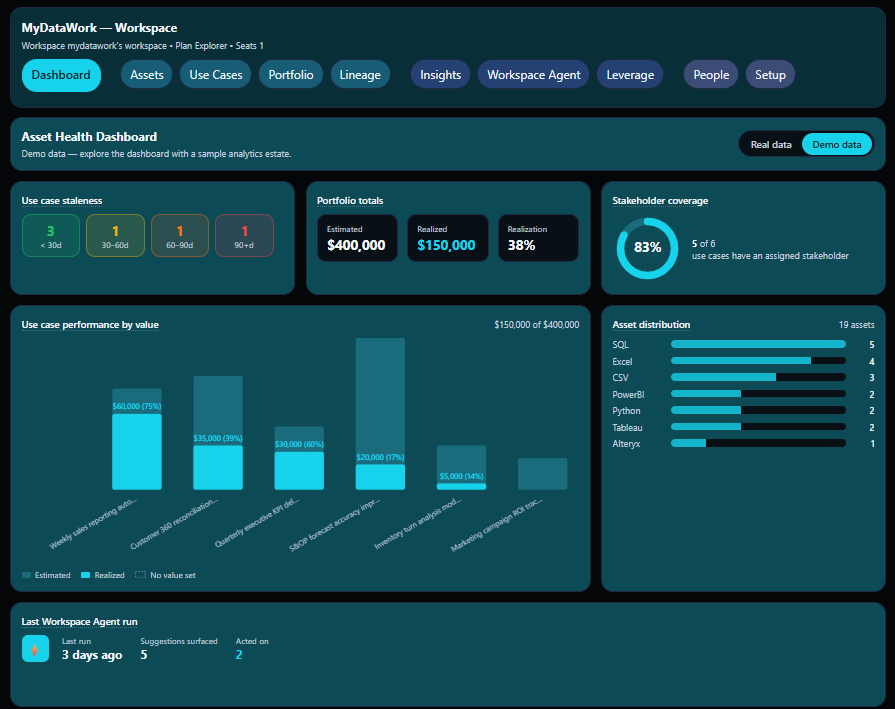
The Dashboard is the first tab in every workspace, built to read in about ten seconds. Six panels summarize your real data — value, freshness, coverage, tool mix, and what the Workspace Agent last found — and they reflect exactly what you see on the Assets tab (your own work plus anything shared to the team), so the numbers always reconcile with the rest of the app.
Features
- Portfolio totals — estimated vs. realized value across your active use cases, plus the realization rate
- Use case staleness — active use cases bucketed by freshness, so stalled work is obvious at a glance
- Stakeholder coverage — how many of your active use cases have an assigned stakeholder, and how many don't
- Value distribution — realized values plotted against the workspace mean and median, flagging when a single use case may be skewing your total
- Tool distribution — asset count by tool family (SQL, Tableau, Excel, …)
- Workspace Agent activity — findings surfaced and acted on in the last 14 days

The asset catalog
Know what you have and why it matters
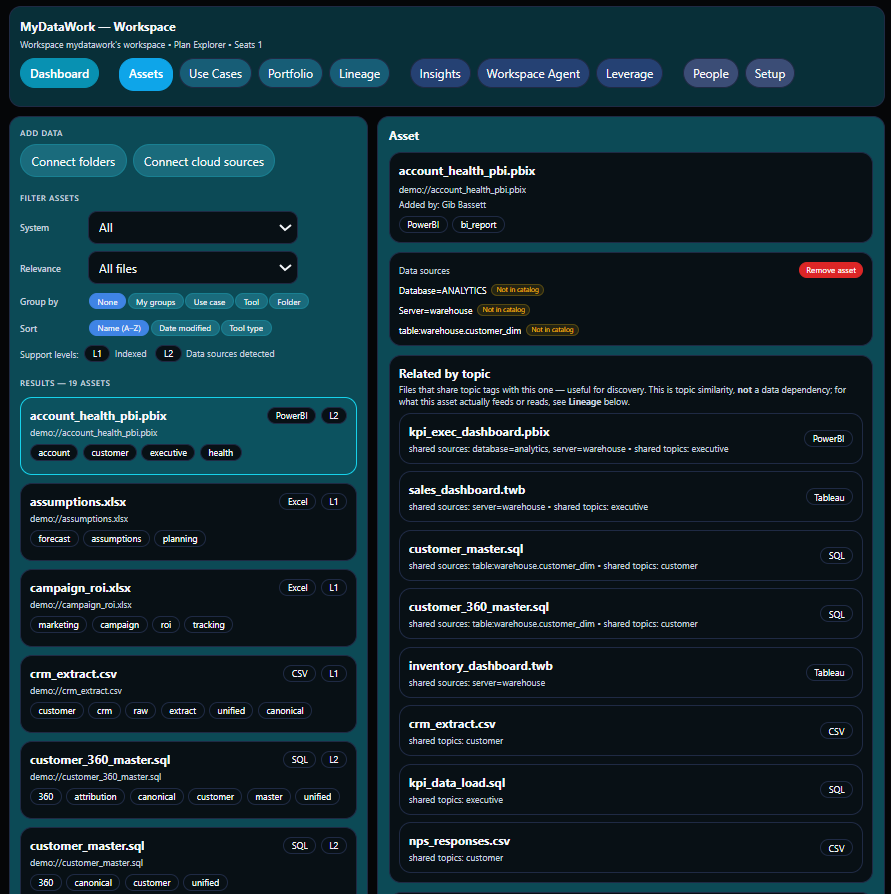
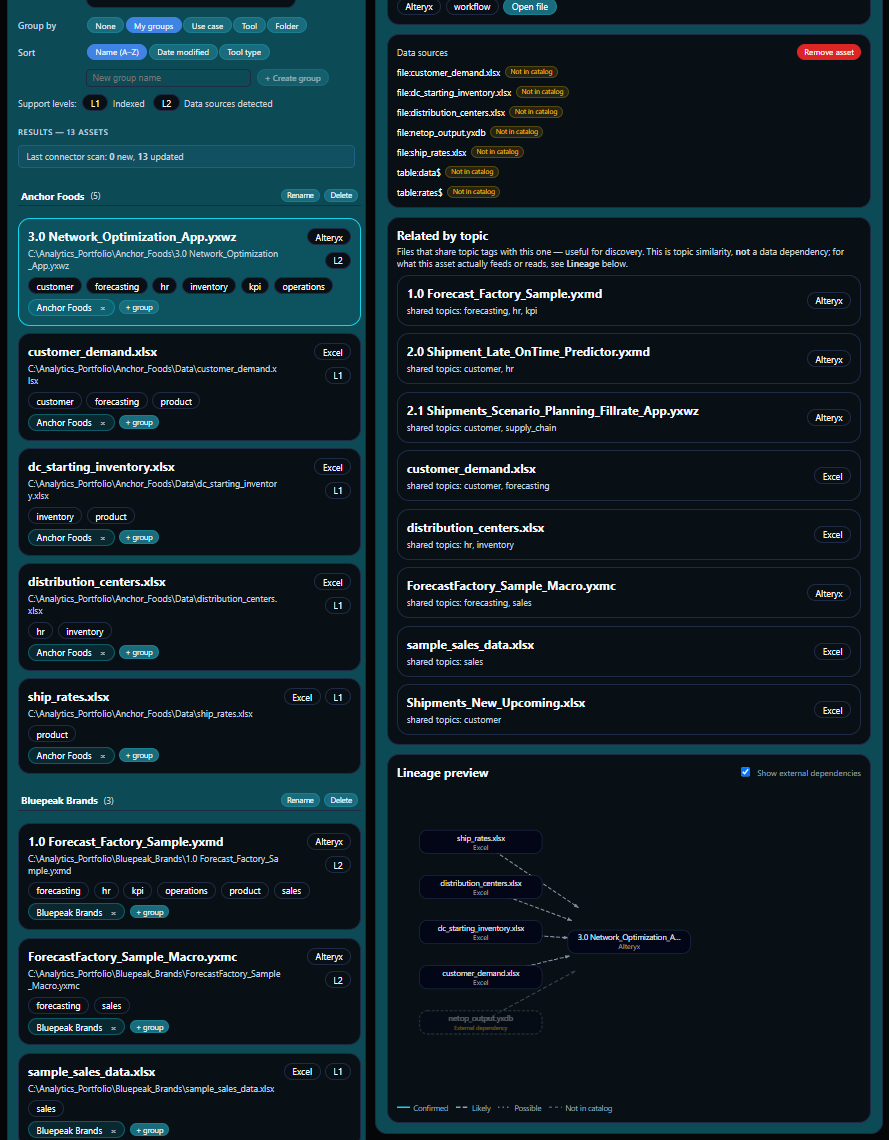
Your files don't exist in isolation. MyDataWork connects each one to the use cases it supports, the data sources it draws from, and the people who depend on it — automatically, from metadata alone. The Windows Connector that indexes your local files is code-signed, so it installs without an unknown-publisher warning.
Features
- Catalog every file with its tool type, path, data sources, file size, creation date, and file relevance (current, recent, archived)
- Support for the analytical tools data teams actually use — Power BI, Tableau, Alteryx, SQL, Python, Excel, CSV, Jupyter notebooks, ThoughtSpot, Dataiku, and Looker LookML
- See related assets automatically — no manual linking required
- Connect files to the use cases and outcomes they support
- Understand your data landscape without opening a single file
- In team workspaces, see who connected each asset — so you always know who to ask

Asset groups
Organize work by project, client, or domain
Not all your work belongs together. Group assets by client, project, team, or domain — then scope any AI analysis to a single group. Run Propose, Leverage, the Workspace Agent, or an Estate Assessment against one client's work, with the rest of your workspace kept out of the picture. For consultants, agencies, and teams juggling multiple engagements, it keeps each body of work clean and self-contained — in one workspace.
Features
- Group assets by project, client, team, or domain
- Scope any AI function — Propose, Recommendations, Leverage, the Workspace Agent, the Estate Assessment — to a single group
- Keep multi-client or multi-project work cleanly separated without separate workspaces
- Deliver a focused Estate Assessment or portfolio for one client or domain, not just the whole workspace

Use cases and outcomes
Turn recurring work into documented value
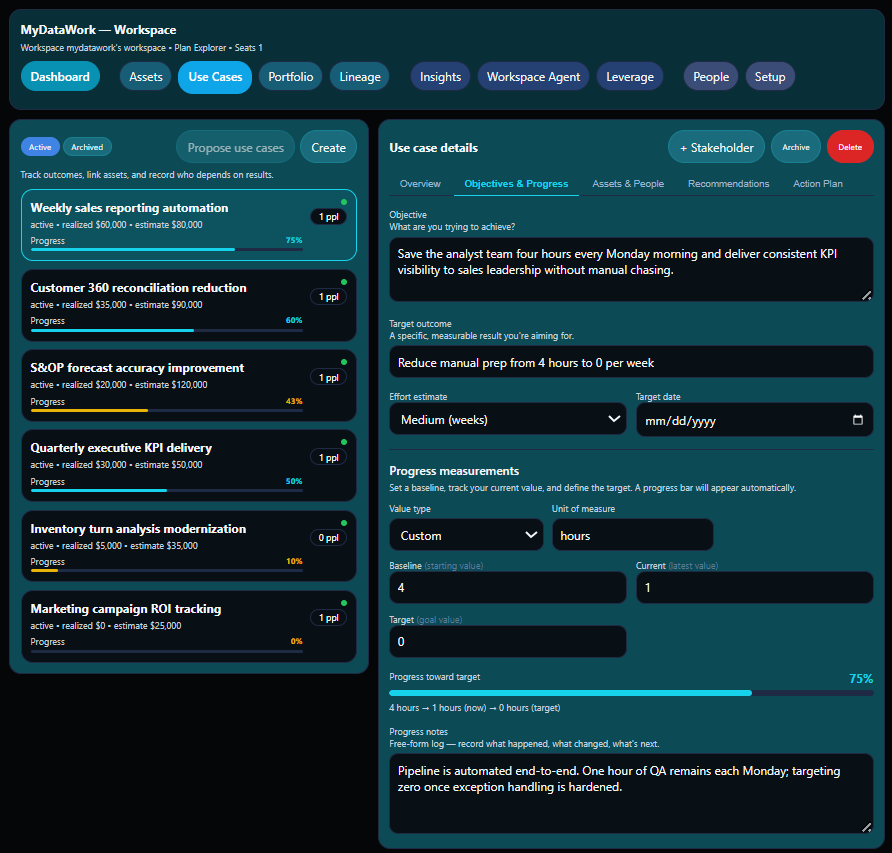
Every dashboard, forecast, and report you produce supports something. Use Cases give you one place to record what that is — the objective, the files behind it, the stakeholders who depend on it, and the progress you're making.
Features
- Document objectives and track progress with baseline, current, and target values
- Link the assets that support each deliverable
- Record stakeholders and communication history
- Group related use cases into Initiatives — then filter Portfolio, Insights, and any AI analysis to one program
- Link each use case to running notes wherever they live — Google Docs, Notion, Confluence — with a one-click "Open notes" button
- Build an action plan and surface AI-generated recommendations
- Push use case summaries to Jira as a new issue or comment — one click, one-way, no double entry
- Track baseline-to-realized value and surface under-tracked use cases

Accelerators
Solution Packs — start from a plan, not a blank page
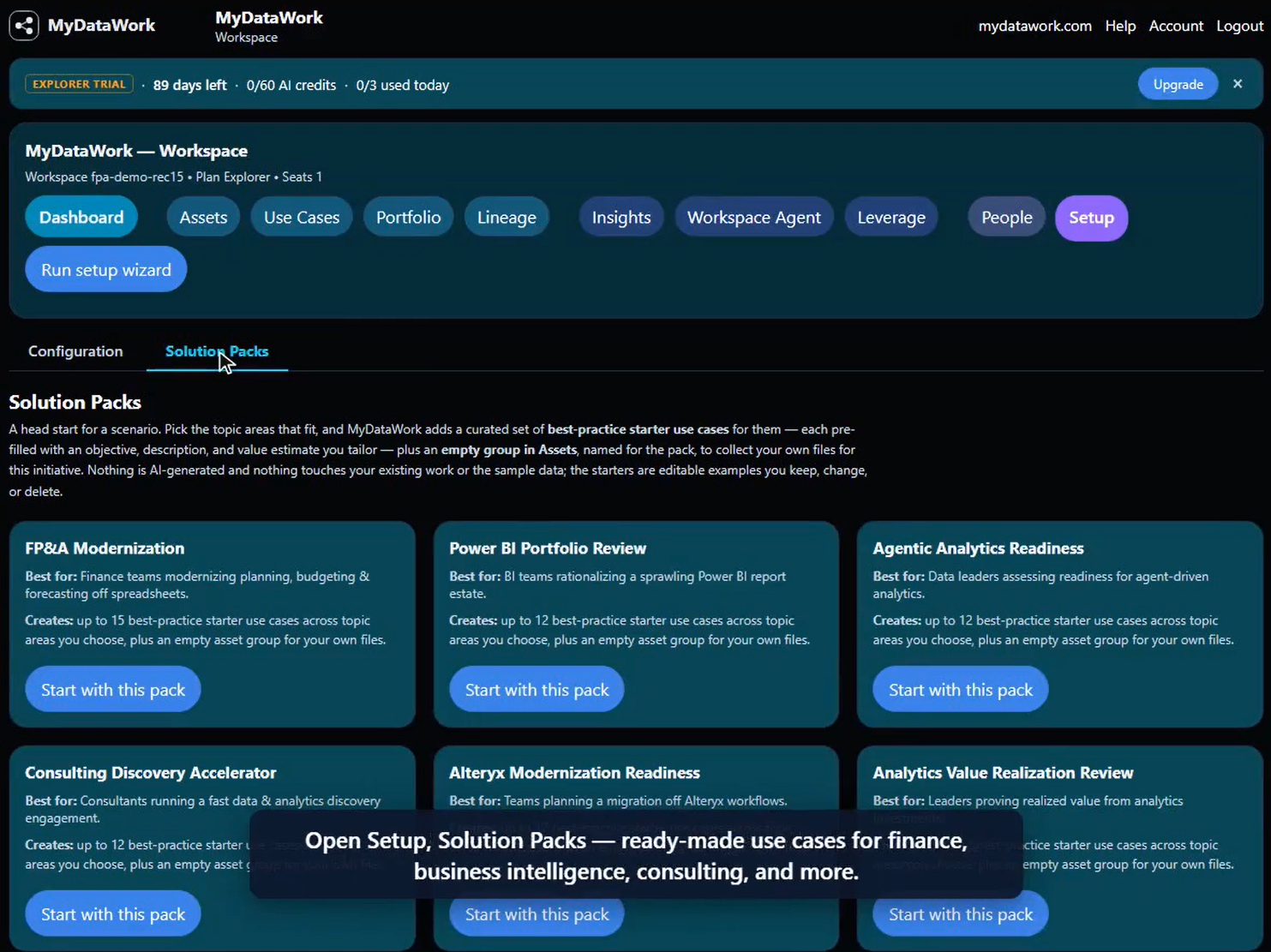
Not sure where to begin? Solution Packs drop a curated set of best-practice starter use cases into your workspace — editable examples you tailor, grouped into an Initiative so your workspace is organized from the first click.
Features
- Six packs: FP&A Modernization, Power BI Portfolio Review, Agentic Analytics Readiness, Consulting Discovery Accelerator, Alteryx Modernization Readiness, and Analytics Value Realization Review
- Pick the topic areas that fit — nothing is pre-selected
- Free on every plan; no AI credits
- Starters arrive grouped under a pack-named Initiative

Lineage
See how your work connects
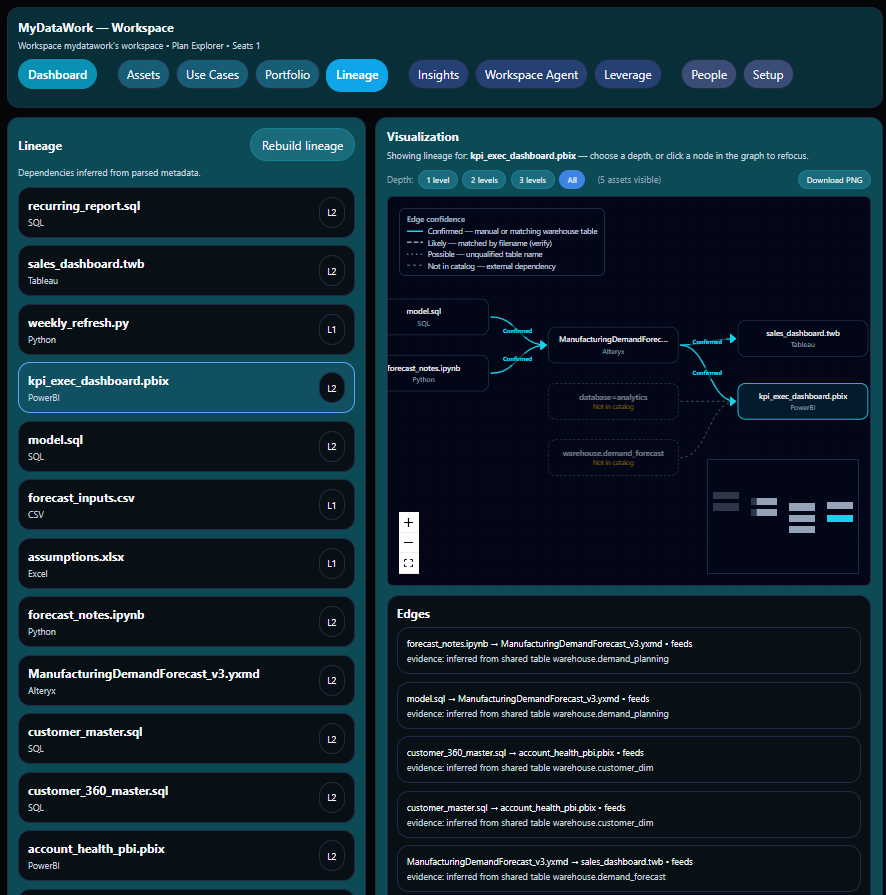
When a table changes upstream, which reports break? When a stakeholder asks "where does this number come from?" — you need an answer in seconds, not hours. MyDataWork builds a lineage map automatically from your file metadata — from shared warehouse tables and the files your work reads. Lineage you can trust — every connection is labeled Confirmed, Likely, or Possible, with the evidence behind it. No black-box graph: you see exactly why two assets are linked. Governed catalogs assert lineage flatly; MyDataWork shows you how confident each link is.
Features
- Trace data flow from source files to final outputs
- Identify dependencies before making upstream changes
- Answer 'where does this number come from?' in seconds
- Onboard new team members with a visual map of your environment

Portfolio Export
Share your work in terms leaders understand
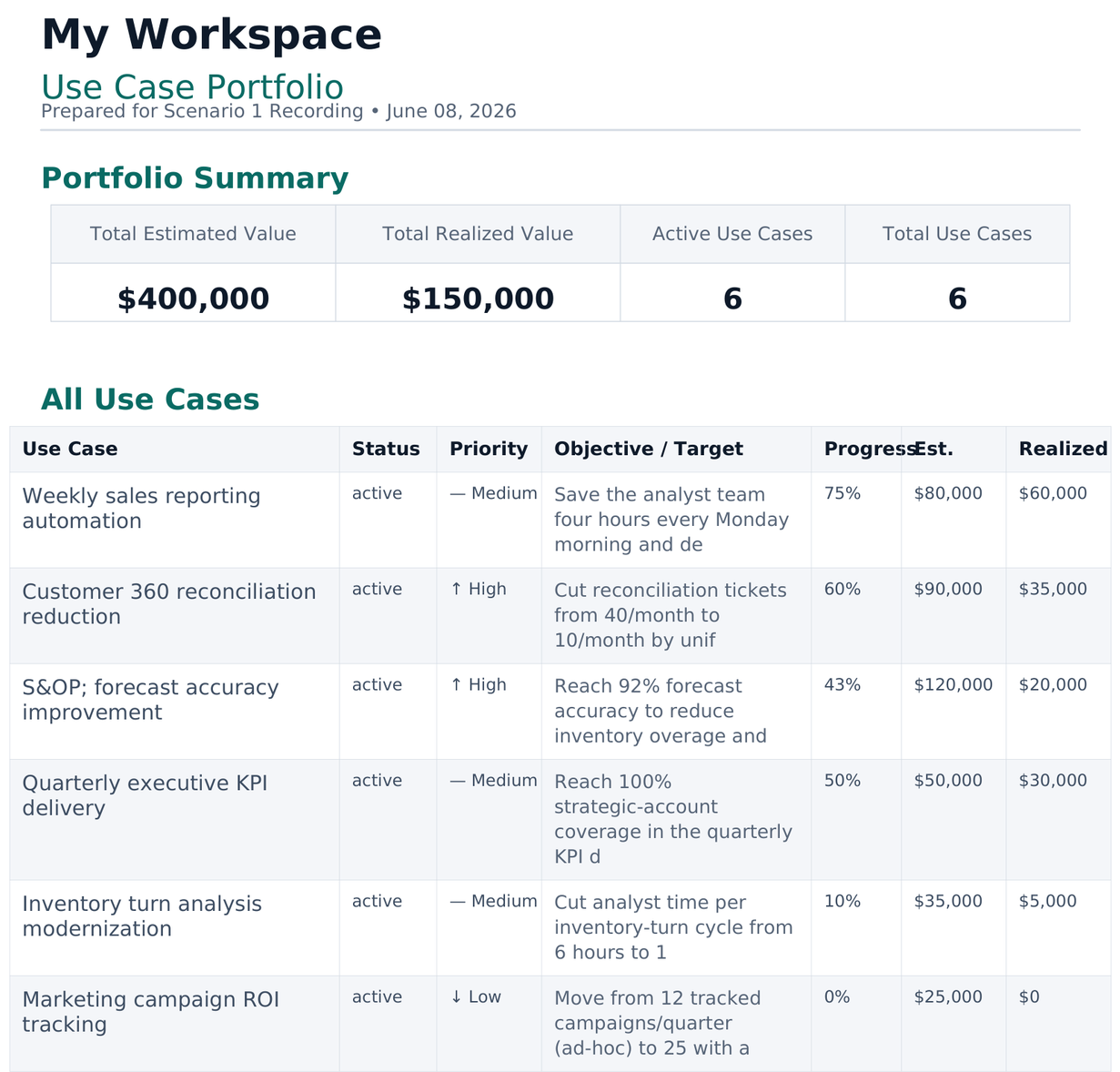
A business review shouldn't require access to your tools. Export a clean summary of your use cases, outcomes, stakeholders, and value delivered — as a PowerPoint or PDF — ready for a leadership conversation or governance review.
Features
- Export use cases and outcomes as PowerPoint or PDF
- Show estimated and realized value across your portfolio
- Share with stakeholders who don't have app access
- Present your data work in business terms, not technical ones
- Mean and median value comparison surfaces when one use case may be skewing your portfolio total — so your numbers stay honest

Agent Access
Hand your AI agents the context — never the data
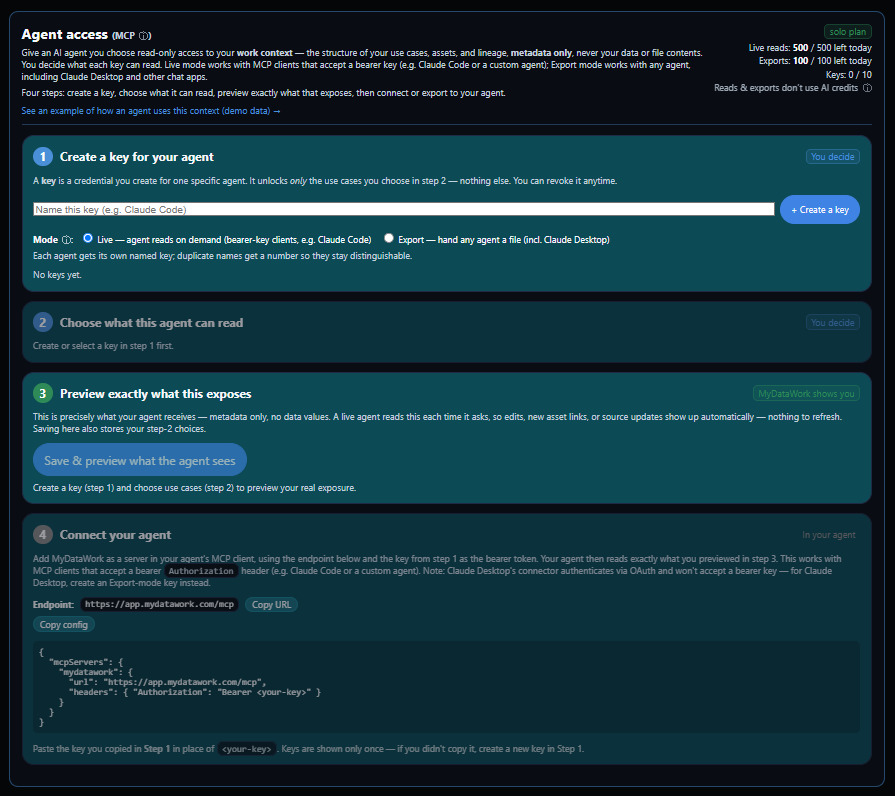
The context you've built — your use cases, the assets behind them, and the lineage that connects them — is exactly what an AI agent needs to reason about your work instead of guessing. Agent Access gives an agent you choose read-only access to that structure over the Model Context Protocol (MCP), the open standard for connecting agents to tools. You pick which use cases it can see, preview exactly what that exposes, and revoke it anytime. The agent receives metadata only — names, tool types, schema, lineage, and outcomes — never your data values, file contents, or stakeholder names.

Features
- Read-only access to your use cases, their linked assets, and the lineage between them — over MCP, the open agent-to-tool standard
- Metadata only: asset names, tool types, schema, lineage, and outcomes — never data values, file contents, or stakeholder names
- Live mode for bearer-key clients (Claude Code, your own agent) reads current context on demand; Export mode hands a point-in-time file to any agent, including Claude Desktop
- Scope every key to specific use cases and preview precisely what it exposes before you share
- A per-asset source list (system, schema, table) tells your agent where the data lives — MyDataWork provides the map, never the credentials or the data itself
- Every grant change and read recorded in an audit log; revoke any key anytime. Agent reads draw on their own daily allowance, separate from your AI credits

Agent Studio
Scope an AI Agent Before You Build One
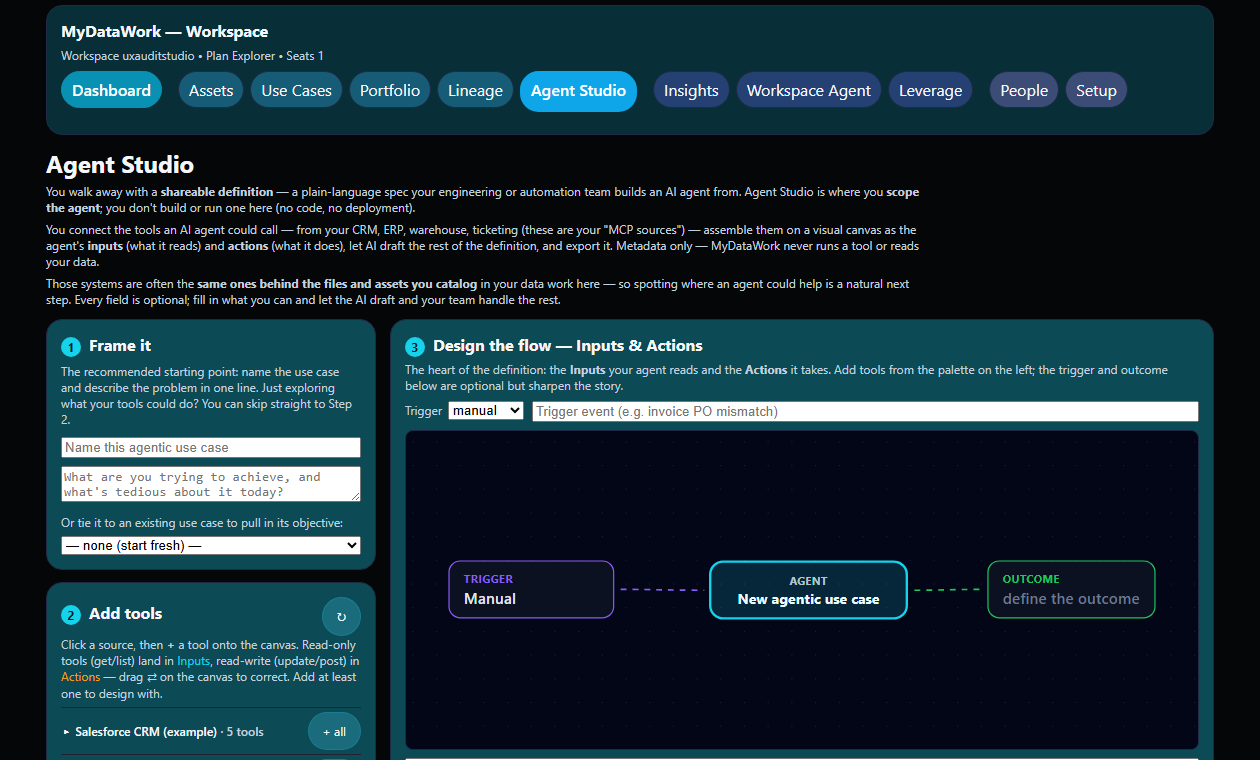
From the MCP tools your systems already expose, design what an AI agent should do — its inputs, actions, guardrails, and oversight — and export a shareable definition your engineering or automation team builds from. You don't run an agent here; you decide what's worth building and how the pieces fit. Metadata only — MyDataWork never runs a tool or reads your data.
Features
- Assemble your systems' MCP tools as the agent's read-only Inputs and read-write Actions on a visual canvas
- Start from a real problem, or from a use case you already track
- Let AI draft the value case, persona, reasoning approach, and governance — with an anti-"agent-washing" check
- Export a definition (PDF or PowerPoint) with a flow diagram — ready to hand off, and to govern at your MCP control point

AI Analysis
Go further with AI built into your workflow
AI-powered analysis that works directly from your documented assets and use cases — no separate tool, no setup. Every action shows its credit cost before you click, failed calls refund automatically, and results are saved and shareable. If you need more than your daily allowance, one-time credit packs top up instantly and never expire.
Features
- Use case proposals from your cataloged assets, industry, and team — a starting point when you know the work matters but haven't documented it yet
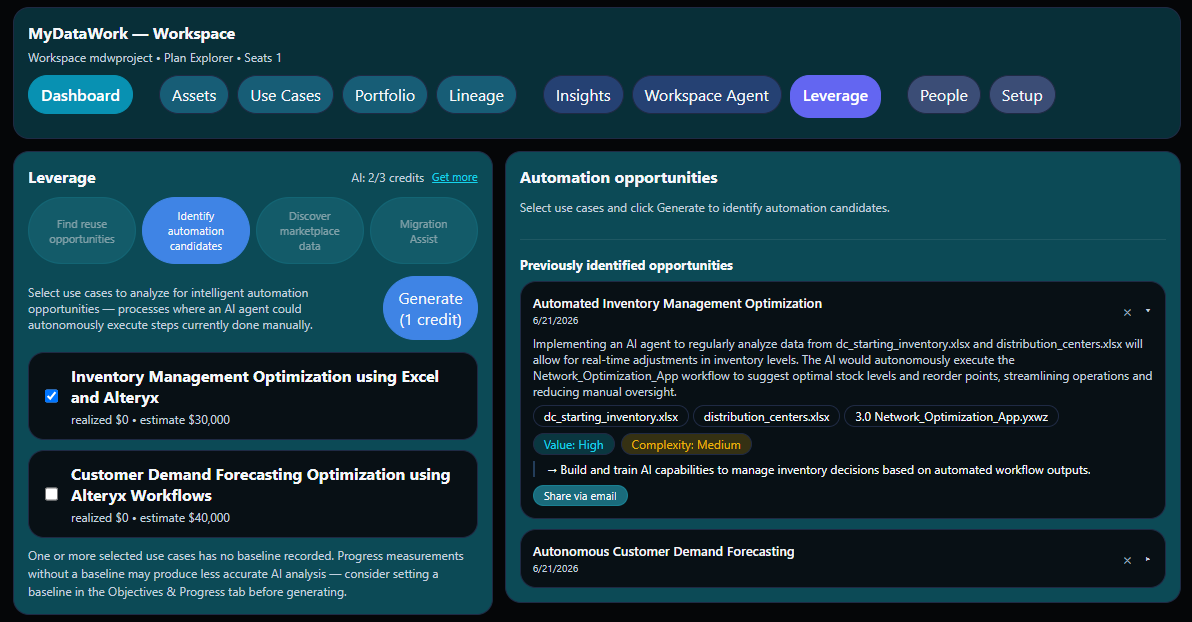
- Identify automation candidates within your use cases, complete with value and complexity ratings and concrete next steps
- Find reuse opportunities across your portfolio — work already done that could be applied to new objectives
- Discover external datasets from cloud marketplaces (Databricks, Snowflake, and others) that could enrich your use cases
- Migration Assist: evaluate tool modernization with effort estimates, confidence ratings, and migration recommendations
- Ask the MyDataWork Assistant anything about your workspace — from the chat button on every screen
- Run an Asset Estate Assessment from Setup — an AI review covering connections worth documenting, use-case opportunities, and health observations, across your whole workspace or scoped to a single client or project group

Workspace Agent
Catch what no single view reveals — on demand
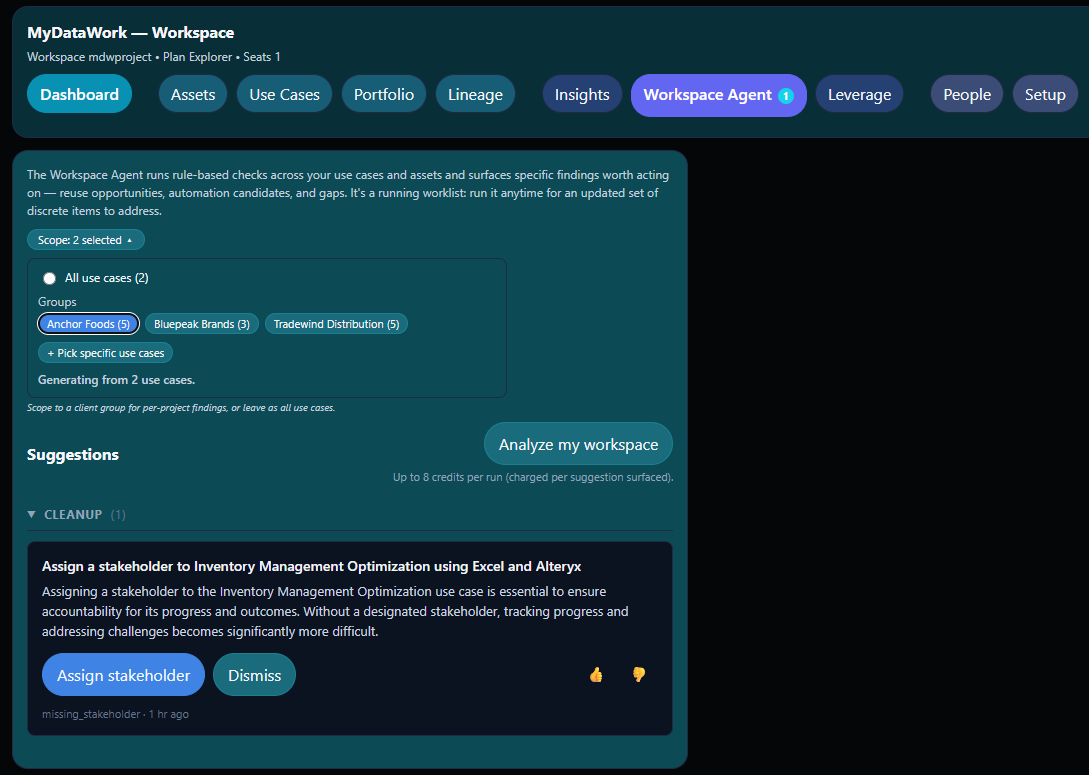
Your workspace can look organized from inside any one view, while the patterns that matter most live across views. A dashboard quietly load-bearing across multiple use cases. A stalled effort whose assets keep accumulating. A high-value initiative tracking below estimate without recent updates. The Workspace Agent reviews your entire workspace across six checks — grouped into Cleanup, Activity, and Insight — and surfaces what's worth your attention. You decide when to run it. You're charged only for what it finds. Your first two Analyze runs are free attempts that don't touch your daily credits.
Features
- Six checks across three categories — Cleanup (missing stakeholders, removed assets still depended on), Activity (stale work, new assets not yet linked), Insight (high-value use cases without momentum, hidden-infrastructure assets)
- One-click Analyze button — no scheduling, no autonomous behavior, you decide when
- Each finding links directly to the relevant item — and the agent auto-resolves it once you address the underlying condition
- Deterministic detection logic with named thresholds; LLM phrases each finding using your actual workspace contents
- Credit cost displayed before you click — one credit per surfaced finding, capped per run; a run that finds nothing costs nothing
- Findings history persists in your workspace export — auditable record of what was flagged when

Teams and Collaboration
Built for the whole data team
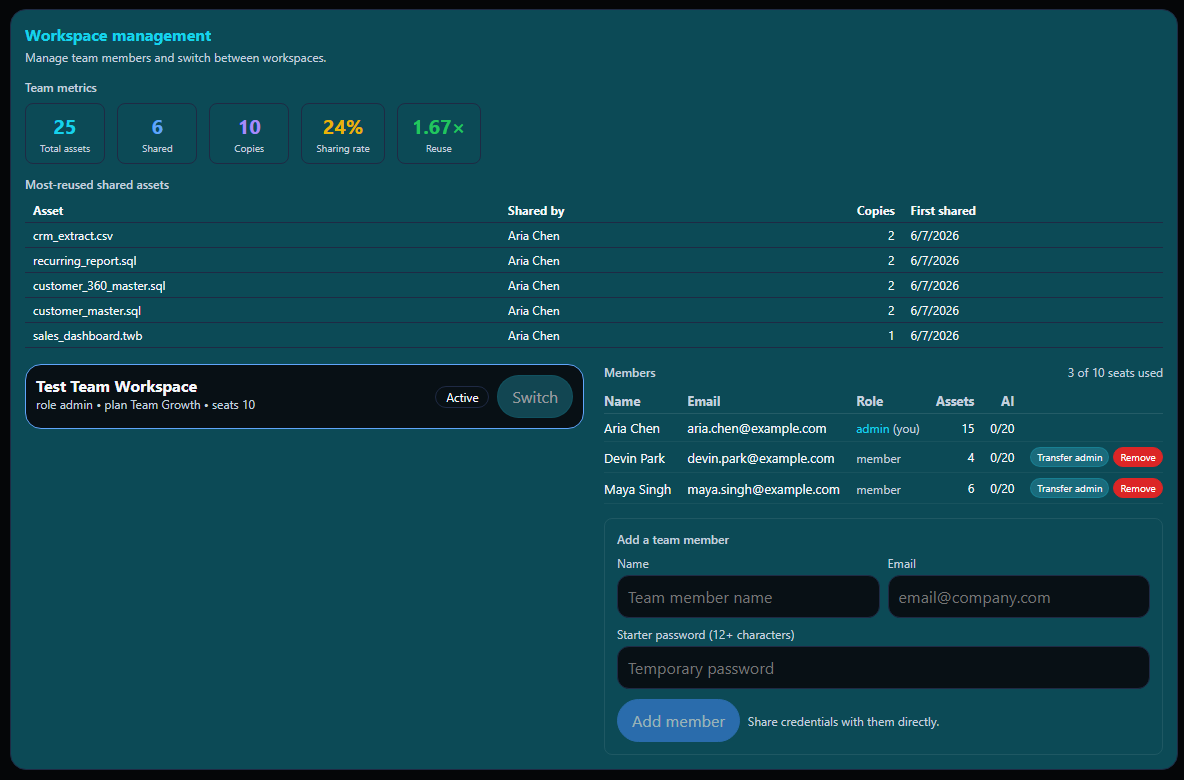
Data work isn’t done alone — but it isn’t always done in the open either. MyDataWork Team plans give each member their own workspace where their work-in-progress stays private, alongside a shared team space where members publish select assets when they’re ready. Admins see how the team is adopting the tool through aggregate metrics — never per-member behavior. Members keep their autonomy. The team gets visibility into what’s being shared and reused.
Features
- Personal workspaces for every team member — connect your full working folders without exposing drafts or work-in-progress
- Share assets to a team bulletin board when you’re ready; teammates can copy them into their own workspace independently
- Team Metrics panel for admins — see total assets, sharing rate, reuse, and 30-day activity at a glance
- Admin-managed seats (2-5 for Team Starter, 6-10 for Team Growth) with member roles and ownership transfer
- Admin creates member accounts directly — no email invites required
- Enhanced Jira integration available on all paid plans

Data Catalog Complement
Already using a data catalog? MyDataWork fills the gap it leaves.
Enterprise data catalogs govern technical and business metadata at scale. What they don’t capture is the living context around analyst work — the use cases, stakeholders, KPI meanings, action plans, and continuity notes that make catalog data meaningful. MyDataWork captures that layer, at the analyst level, without an IT project.
Features
- Capture asset-to-use-case relationships your catalog doesn't track
- Record working KPI definitions and business meanings
- Preserve stakeholder context and action plans around catalog assets
- Evaluate whether catalog assets are running on the right tools — and identify modernization opportunities before migration conversations begin